To be done:
Hardware failures:
September 29, 2026
- Nvidia released Cosmos 3, which is a Mixture of Transformers.
- It can combine text, images, video, audio and ACTIONs to text, images, video, audio and ACTIONs.
- At the end of the video also soccer action was shown.
- I don't see the soccer case in the Cosmos cookbook.
- The LoRA post-training is on sports video generation, which all examples soccer based.
May 21, 2026
- There is a KickStarter for SpikerRobot, a robot programmed by wiring neurons (including inhibition, so sound as behavior-based).
March 13, 2026
March 6, 2026
- Trying the LeRobot Tutorial working without the virtual image.
- Installed under WSL lerobot github.
- Trying pip install -e ., although pip install lerobot would also be a good choice.
- The virtual image has a lerobot/common/robot_devices/robots/configs.py, while the github has three configs.py (lerobot/async_inference/configs.py, lerobot/cameras/configs.py, lerobot/envs/configs.py.
- According to the Waveshare tutorial, the configs.py should define the communication ports of both arms and the port values of both cameras.
- This also requires a sound-card.
- The pip install -e . fails on missing permissions on /usr/local/lib/python3.10/dist-packages/.
- Installing lerobot also installs opencv, torch and rerun-sdk.
- Next step could be Find your camera with the command lerobot-find-cameras opencv.
- Install is not perfect, with missing spatialmath-python and a too high version of numpy for d2l and rvc3python.
- Installed the 2nd USB-camera. Found right-size screws (lost some the last time). Slightly longer, so I had to use also two originals (one left).
- The command lerobot-find-cameras couldn't find any cameras. Also don't see any /dev/video* devices.
- Switching to native Ubuntu. I see 8 different devices (USB-switch on IN2, both cameras on IN2).
- Installation failed, due to no space left on device.
- Used some tricks from this post, including find . -size +50000 -exec ls -lahg {} \;
- That works, although lerobot-find-camera now fails on importing opencv.
- Numpy 2.26 is too new. Now installing 1.20, but should use 1.26
- Numpy still gives an error, now on the cv2/gapi subpackage.
- Instead of upgrading numpy, updated opencv with pip install opencv-python==4.12.0.88. That worked, /dev/video4 seems the left USB-camera. /dev/video2 looks like a dark image of the ceiling. /dev/video6 gives read error.
March 2, 2026
- Last week the LeRobot paper was published on arXiv.
February 19, 2026
- Roboplan also has an experimental ros github
- They released version 0.2.0, including a new solver (Optimal Inverse Kinematics)
- There are also a number of project ideas, including ros examples and robot learning examples.
- Next to LeRobot, they also point to Neuracore.
February 13, 2026
- Did a sudo apt search python3-* | grep extra and installed sudo apt install python3-extras and sudo apt install python3.10-dbg. Hopefully this will prevent switching in the background from python3.10 to python3.6.
February 12, 2026
- My laptop nb-dual was rebooted, so could connect again to /dev/ttyUSB0.
- Gave some MoveIt demonstrations.
- Added export ROARM_MODEL=roarm_m3 to my ~/.bashrc.
- Continued with Tutorial 6. The command ros2 service call /get_pose_cmd roarm_msgs/srv/GetPoseCmd failed on import rosidl_typesupport_c
- This is a reoccuring issue. Jake-Carter suggested to check pip show rosidl-generator-c . That showed that version 3.18 was in installed in /opt/ros/humble/local/lib/python3.10/dist-packages. Jake's suggestion was to use pyenv, which is not trivial to install.
- Another option would be to add /opt/ros/humble/local/lib/python3.10/dist-packages to the PYTHONPATH. (not needed, already part of the PYTHONPATH)
- Also pip show rosidl-typesupport-c shows that it is installed.
- Did pyenv global 3.10.12. Now colcon build gives that catkin_pkg is not installed. Installed it for the pyenv-version with python3 -m pip install catkin_pkg.
- The package roarm_msgs needs rosidl-generate-interfaces, which needs the python package em. Yet, with em version 0.4.0 I get the AttributeError: module 'em' has no attribute 'Interpreter'.
- The package 'em' is really ancient (2014). Downgrading to version 0.3 didn't help.
- Switched (temporary) back to system's python with pyenv shell system.
- Could build system, still the service could find rosidl_typesupport_c
- Added print(sys.version) in the _get_pose_cmd.py. Regular version 3.10.12.
- Did sys.path.insert(0,'/opt/ros/humble/local/lib/python3.10/dist-packages/', still an error. It tries to load module roarm_msgs.roarm_msgs_s__rosidl_typesupport_c, but if you check ~/roarm_ws/install/roarm_msgs/local/lib/python3.10/dist-packages/roarm_msgs you only see the 36m version.
- Tried pyenv install 3.6 and try a build again. Strange enough, I see no python-version definition in any of the roarm_msgs configurations.
- With python 3.6.15 3 packages cannot be build. Yet, roarm_msgs is, so try.
- Still same error. Switched back to normal with pyenv global system and rebuild the whole set again with colcon build --symlink-install.
-
- Instead tried Tutorial 7: RoArm-M3 Moveit MTC Demonstration. The Cartesian demonstration worked: the robot followed the provided path.
- Finished with the pick_and_place path. Ready with the ROS-tutorials.
-
- Tried some suggestions from UvA AI Chat. Tried from roarm_msgs.srv import GetPoseCmd directly in python3, which works.
- Did extensive debugging together wit UvA AI Chat. Problem was that I used Python3.10, but used for PythonExtra and PythonInterp python3.6. The suggestion was to use the following cmake-args:
colcon build \
--packages-select roarm_msgs \
--cmake-args \
-DPYTHON_EXECUTABLE=/usr/bin/python3 \
-DPython3_EXECUTABLE=/usr/bin/python3 \
-DPYTHON_INCLUDE_DIR=/usr/include/python3.10 \
-DPYTHON_LIBRARY=/usr/lib/x86_64-linux-gnu/libpython3.10.so
- Now the command ros2 service call /get_pose_cmd roarm_msgs/srv/GetPoseCmd gives response: roarm_msgs.srv.GetPoseCmd_Response(x=0.273914183652077, y=0.0, z=0.09799691654599914, roll=0.0, pitch=3.673205103416066e-06, yaw=0.0)¨.
- Also the other commands, until ros2 service call /move_circle_cmd roarm_msgs/srv/MoveCircleCmd "{x0: 0.2, y0: 0.1, z0: 0.2, x1: 0.2, y1: 0.2, z1: 0.2 }" work fine. It only moves the arm in Rviz, should try again with the drivers also working in the background:
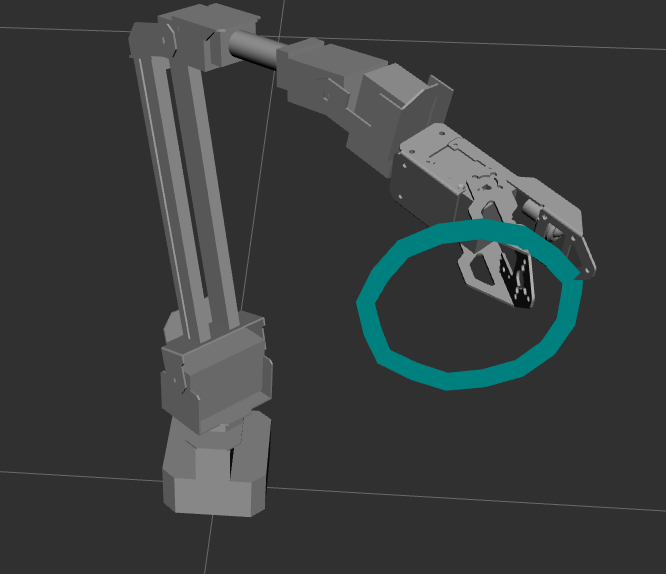
- Had to build also the other packages, because I had cleared the whole workspace. With the driver ros2 run roarm_driver roarm_driver and moveit_cmd ros2 launch roarm_moveit_cmd command_control.launch.py running, the real robot also moved a circle.
February 10, 2026
- Switched to the Linux-partition of nb-dual. Starting with ROS2 Tutorial.
- Tutorial 1 is an install is based on a 4 Gb virtual machine.
- Tutorial 2 points to roarm_ws on github. Also looked at the development version, which is 4 months younger, 3 commits ahead (but 17 commits behind). For the moment, I cloned the default branch.
- Did sudo apt install ros-humble-moveit-*, which installed 96 packages.
- The next command is sudo apt remove ros-humble-moveit-servo-*, which only removes one package (ros-humble-moveit-servo-dbgsym). The other packages were already installed.
- Also tried rosdep install -i --from-path src --rosdistro $ROS_DISTRO -y , which failed on missing package ros-humble-warehouse-ros-mongo. Strange, it is an official ROS Humble package. I am not the only one with this issue.
- The pip install -r requirements.txt installed two packages: Successfully installed roarm-sdk-0.1.0 simplejson-3.20.2.
- Started with the first build command: colcon build --packages-select roarm_msgs . Only a warning on CMP0148 policy. Could be solved with modifying the CMakelist.txt (see VAR Labbook November 12, 2025:
cmake_minimum_required(VERSION 3.10)
cmake_policy(SET CMP0148 OLD)
- The ~/roaram_ws/src/roarm_main/roarm_msgs/CMakeLists.txt still used cmake_minimum_required(VERSION 3.5). No warnings after modification.
- Next command is colcon build --packages-select moveit_servo . Several warnings:
- You did not request a specific build type: Choosing 'Release' for maximum performance
- Policy CMP0167 is not set: The FindBoost module is removed
- Continued without solving those two warnings.
- The third package colcon build --packages-select rviz_marker_tools gives the warning 'rviz_marker_tools' is in: /opt/ros/humble.
- The same for colcon build --packages-select moveit_task_constructor_msgs. Skipped also the the next move_task_constructor_* builds. Why was moveit_servo not in /opt/ros/humble?
- The command colcon build --packages-select roarm_moveit_cmd actually succeeds after many warnings. I see a policy CMP0167 warning, followed by several warnings that ARM_*_LENGTH_* are already defined, that a deprecrated moveit::core::MoveItErrorCode is used.
- The command colcon build --packages-select roarm_moveit_ikfast_plugins gives only a policy CMP0167 warning.
- The command colcon build --packages-select roarm_moveit_mtc_demo indicates the packages moveit_task_constructor_core,
- moveit_task_constructor_capabilities are not locally build, but official /opt/ros/humble versions are used. Again the the policy CMP0167 warning, a deprecated warning to use #include instead instead of #include "pick_place_parameters.hpp".
- The last colcon build --packages-select roarm_moveit_servo fails that it cannot find the previous build package roarm_msgs. Running source install/setup.bash before the build solves that. Only some policy CMP0167 warnings
- Finished with colcon build --packages-select roarm_description roarm_driver roarm_moveit --symlink-install, which only complains on roarm_description (Compatibility with CMake < 3.10 will be removed from a future version of CMake. Upgraded the CMaklist.txt from version 3.8 to 3.10. Warning is gone.
- Don´t forget to do export ROARM_MODEL=roarm_m3.
-
- After the lunch further with Controlling a Physical Robotic Arm with Driver Nodes.
- With sudo dmesg | grep cp210 I see agian that the converter is attached to ttyUSB0.
- Tried ros2 run roarm_driver roarm_driver --ros-args --remap serial_port:=/dev/ttyUSB0. With ros2 node list I see only one node: /roarm_driver. With ros2 topic list I see:
/joint_states
/led_ctrl
- The command ros2 topic pub /led_ctrl std_msgs/msg/Float32 {"data: 255"} -1 is converted to json-command b'{"T": 114, "led": 255.0}\n'. Yet, the LED is not switched on.
- If I start ros2 launch roarm_description display.launch.py, json-messages like b'{"T": 102, "base": 0.0, "shoulder": 0.0, "elbow": -0.0002550000000000052, "wrist": 0.0, "roll": 0.0, "hand": 3.141592653589793, "spd": 1000, "acc": 50}\n' are send, but that gives an error: [BaseController] [base_ctrl.feedback_data] unexpected error: 'NoneType' object has no attribute 'decode'.
- The code from the UART tutorial was still in ~/onderwijs/RobotsThatLearn/RoArm-M3
- Problem was that the lower board was active, but the upper board not. Switched it on, could control the LED. Robot is still laying down.
- Could control all links from the Joint State publisher.
-
- Next option is Interacting with the Robotic Arm End Effector Using MoveIt2.
- Started ros2 launch roarm_moveit roarm_moveit.launch.py. Start gives a double warning:
WARNING:root:Cannot infer URDF from `~/roarm_ws/install/roarm_moveit/share/roarm_moveit`. -- using config/roarm_m3.urdf
WARNING:root:Cannot infer SRDF from `~/roarm_ws/install/roarm_moveit/share/roarm_moveit`. -- using config/roarm_m3.srdf
Using load_yaml() directly is deprecated. Use xacro.load_yaml() instead.
- This script starts several nodes:
/gripper_controller
/hand_controller
/interactive_marker_display_105542942004848
/joint_state_broadcaster
/move_group
/move_group_private_109447895405984
/moveit_simple_controller_manager
/roarm_driver
/robot_state_publisher
/rviz
/rviz_private_130868795036144
/transform_listener_impl_5ffda1547000
/transform_listener_impl_5ffda1644e90
/transform_listener_impl_638ad2ee01c0
/transform_listener_impl_7706440040b0
- This script publishes several topics:
/attached_collision_object
/camera_info
/clicked_point
/collision_object
/display_contacts
/display_planned_path
/dynamic_joint_states
/filtered_depth
/filtered_depth/compressed
/filtered_depth/compressedDepth
/filtered_depth/theora
/filtered_label
/filtered_label/compressed
/filtered_label/compressedDepth
/filtered_label/theora
/goal_pose
/gripper_controller/transition_event
/hand_controller/controller_state
/hand_controller/joint_trajectory
/hand_controller/state
/hand_controller/transition_event
/head_mount_kinect/depth_registered/camera_info
/head_mount_kinect/depth_registered/image_raw
/initialpose
/joint_state_broadcaster/transition_event
/joint_states
/led_ctrl
/model_depth
/model_depth/compressed
/model_depth/compressedDepth
/model_depth/theora
/monitored_planning_scene
/motion_plan_request
/parameter_events
/planning_scene
/planning_scene_world
/recognized_object_array
/robot_description
/robot_description_semantic
/rviz_moveit_motion_planning_display/robot_interaction_interactive_marker_topic/feedback
/rviz_moveit_motion_planning_display/robot_interaction_interactive_marker_topic/update
/tf
/tf_static
/trajectory_execution_event
- Note that in this description also a kinect is mounted on the arm.
- In the planning tab, I selected the gripper-group. Plan & Execute to open, close and random.
- Also used the hand-group, and did a Plan & Execute to home, ready, random and random valid.
- Also tried a random-valid for the group hand-gripper.
- The motion planning also has the option to add Scene Objects (virtual). In Manipulation there is an option Detected Objects.
-
- Also tried Keyboard Control. I could move the end-effector around with the arrow-keys, when I switched to Twist, both in the hand_tcp and base_link.
-
- Restarted the robot, connection is now on /dev/ttyUSB1. Although specified as argument, the roarm_driver.py (line 17), still connects to ttyUSB0
- Code looks OK, easiest is to reboot and try again.
- Could look at this example. Put some prints in the code of roarm_driver.py, to see if the argument is read.
-
February 9, 2026
- The Sandberg All-in-One Laptop powerbank arrived. Connected the DC-cable, selected 12V, and was able to boot the RoArm and perform its initiation routine. Not the cheapest solution, but it works. Great if we use the arm on the robot, not needed when only using the arms for the course.
February 6, 2026
- Seeed's reBot is launched. Tutorials are promised, although Seeed's AI Robot Academy has no Robot Arm tutorials (yet). Yet, there are 8 ROS2 Basics lectures, and a tutorial for ReachyMini.
- Seems that they selected Damiao motors for the arm, with RobStride Motor Control.
- The github of reBot DevArm is now online (updated the Readme, code is still the same as beginning this week).
February 2, 2026
- There is new visualisation tool for ROS2: RQml. Seems to be nicely integrated with Gazebo.
- Also interesting: Seeed's reBot DevArm. Also LeRobot compatible.
January 26, 2026
- Also checked the RoArm-M3 wiki, because that has a Basic Usage section, a Python demo and a number of control and ROS2 tutorials.
- The foam blocks are grasping targets.
- In the setup the camera's are mounted on the passive recording-arms, so 4 USB-cables (two to the arms, two to the camera's) go to the hub. No power supply for the hub:

- Connected one camera to one of the recording-arms. There were not enough screws and spacers, to connect both camera on 4-points. Lost two small screws on the floor.
- In the other connector-bag there was an USB-B to C converter. Put that in port 9. Didn't connect the USB-hub to my laptop or UGV-rover (yet).
- Connected to the access-point and did the WebCtrl-demo. All worked well, openened the gripper, switched on the LED. Only thing that didn´t go as expected was the XYZ-control. I only controlled the Z-axis, but in both directions the end-effector went down.
-
- Checked the IMX355 USB-camera wiki.
- With input-connector up I see with lsusb connected to IN1/USB3. I also see two additional /dev/video* devices. With cheese --device=/dev/video5 I see the IMX355 camera.
- Tried to control the arm with serial_simple_ctrl.py. With sudo dmesg | tail I had seen cp210x converter now attached to ttyUSB0.
- Did python -m pip install serial, which installed serial-0.0.97.
- This sort of worked. I received the error-message: module 'serial' has no attribute 'Serial', which seems a version problem.
- Problem was that I installed serial instead of pyserial (see stackoverflow topic. Although I am part of the dailout group, /dev/ttyUSB0 gave a permission error. Did sudo chmod o+rw /dev/ttyUSB0, wich gave utf-8' codec can't decode byte 0xe0 in position 0: invalid continuation byte. Yet, a second time it worked and I received a lot feedback like:
Received: {"T":1051,"x":350.1528949,"y":-9.670758442,"z":198.1836835,"tit":0.081300982,"b":-0.027611654,"s":0.026077673,"e":1.61528177,"t":0.010737866,"r":0.004601942,"g":3.132388769,"tB":87,"tS":83,"tE":127,"tT":43,"tR":-20}.
- Could also control the robot via the http_simple_ctrl.py (opened and closed the gripper with json cmd: {"T":106,"cmd":3.14,"spd":0,"acc":0}
- More details about the JSON-commands in this tutorial and Robotic Arm Control tutorial (including inverse kinematics commands).
-
- Next step would be to control with ROS2. The Workspace points to github ws.
- First command is given in the next ROS tutorial drive node, which gives ros2 run roarm_driver roarm_driver
January 23, 2026
January 4, 2026
Previous Labbooks