To be done:
- Implement the book exercises in ROS2, which runs on Rover
Hardware failures:
- UGV Rover #4 the rover's camera kept crashing. Also a problem with a broken extension cord?
- UGV Rover #8 has a broken USB-B extension cord. Works also without extension. Cord back in the box.
October 20, 2026
- Looking for where the overlap of the Visual Odometry with later presentations.
- Checking Lecture 3-1: Camera Localization - Peter Corke's section 13.2.
- That lecture directly starts with a recap of camera calibration, for instance with Tsai's Method, which was covered in Lecture 2.
- Camera calibration was covered in Foundation's Chapter 39, some of the illustrations could be a gentle introduction.
- The PnP algorithm is not covered in Foundations. In the Toy example they solve the 12 3D points with DLT algorithm. This could be included as example between slide 21 and 22.
- On October 9, 2026 I solved the lab with cv2.solvePnP. Could be used as example before slide 54.
- That lecture can be found in 2024/ShaodiLectures.
-
- Downloaded the rosbag for the 2nd assignment.
- First had to install sudo apt install ros-humble-rosbag2-storage-mcap before I could do ros2 bag play -s mcap apriltag_2026_01_10/apriltag_2026_01_10.mcap.
- With ros2 topic list I don't see any topics. Different ROS_ID?
- Strange, with ros2 bag info I see the topics:
/image_raw
/tag_localization/camera_pose
/ugv/joint_states
/cmd_vel
/imu/mag
/odom/odom_raw
/tag_camera/camera_info
/ugv/robot_description
/imu/data_raw
/tag_localization/pose
/tag_guided_drive/status
/odom
/tag_localization/status
/camera_info
/tf_static
/tf
/image_raw/theora
/apriltag_detections
/odom_raw
/voltage
/image_raw/compressed
/tag_camera/image_rect
- Tried to run the mcap in the Rerun webviewer on my nb-dual Windows-partition, which took some time to startup but actually worked after while.
- The compressed image_raw gave an error (no codec specified), but was still visible as grey-image.
- The tag_camera seems to be artifical coloured depth from the OAK-D camera.
- The tag_localisation status is "tracking" or "unstable 0/4" or "unstable 1/4"
- When rerun is started from the commandline, there is the option --video-decoder .
- ROS1 has documentation on image_transport_codecs, couldn't find the ROS2 equivalent. There is well maintained ffmpeg_image_transport.
- Doing ros2 run image_transport list_transports indicates that compressed is provided by the package compressed_image_transport, which should be either JPEG or PNG compression. Package info at ROS index.
- Looking at source code. Compression FORMAT is a parameter, which could be 'jpeg', 'png' or 'tiff'.
October 19, 2026
- I found the Introduction lecture a bit short. It covers the history of Visual Odometry. Maybe I could add some material which corresponds with Chapter 44 or part Understanding motion.
October 8, 2026
September 8, 2026
August 22, 2026
- The rosbag keeps complaining:
[WARN] [1787383002.180134307] [rosbag2_player]: New subscription discovered on topic '/obstacle_avoidance/debug/depth_image', requesting incompatible QoS. No messages will be sent to it. Last incompatible policy: RELIABILITY_QOS_POLICY
- Checked the setting with ros2 topic info /obstacle_avoidance/debug/depth_image --verbose:
QoS profile:
Reliability: BEST_EFFORT
Durability: VOLATILE
- Strange, because that is precisely my setting in rviz2. I also receive the images, so the messages are send.
- Also added /obstacle_avoidance/debug/roi_image/compressed to rviz2. The topic is not visable when adding by topic, so maybe that is the source of the 'incompatible QoS' warning.
- Looked at image_view documentation.
- There is also a disparity_view, but the published depth image is NOT a DisparityImage.
- See in the parameters no options to change the QoS, but I see that a parameter encoding can be given. Default is "bgr8"
- Solved, ros2 run image_view image_view --ros-args -r image:=/obstacle_avoidance/debug/roi_image -p image_transport:=compressed works (using -p instead of -r). While it is working, still get a warning:
[WARN] [1787385740.625621770] [image_view_node]: Topic 'image' has not been remapped!
.
- Remapping with -p doesn't work, that only works with -r.
- The command ros2 run image_view image_view --ros-args -r image:=/obstacle_avoidance/debug/depth_image doesn't work, because it cannot display 16UC1 encoding, even when explicitly specified by -p encoding='16UC1'. 16UC1 represents depth in millimetres, AI Chat suggested a convertion script to convert the depth-channel to grayscale: convert_depth_image2mono8.py.
- That works:
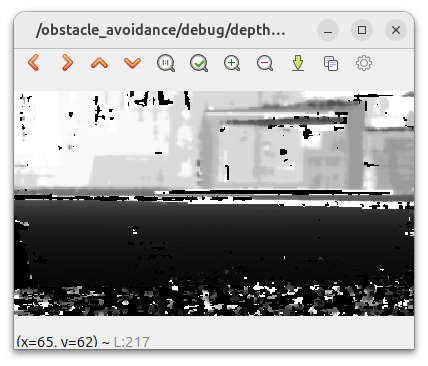
- Checked with ros2 topic hz /obstacle_avoidance/debug/depth_image and ros2 topic hz /obstacle_avoidance/debug/depth_image_mono8, both have an equivalent publishing rate of 1.955 and 2.115 messages per second respectively.
-
- Looking at DephtAI ROS Driver documentation.
- Starting up should be simply ros2 launch depthai_ros_driver driver.launch.py
- From the RTMAP example I expect topics like:
imu
rgb/image
rgb/camera_info
depth/image
- Yet when launched from ugv_vision, I expect oak in front of the topics.
-
- Connected the UGV Rover #2 to my home-network.
- Tried ros2 launch ugv_vision oak_d_lite.launch.py but had to remover the depthai_ros_driver_v3 first by sudo apt remove ros-humble-depthai-* followed by sudo apt install ros-humble-depthai-ros-driver.
- Now ros2 launch ugv_vision oak_d_lite.launch.py works, and gives bot /oak/rgb/image_raw and /oak/stereo/image_raw.
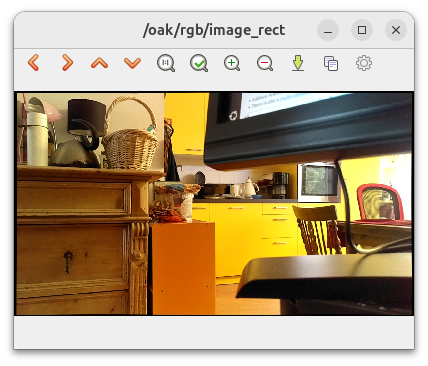
- The command ros2 run image_view image_view --ros-args -r image:=/oak/rgb/image_rect -p image_transport:=compressed works:
- The command ros2 run image_view image_view --ros-args -r image:=/oak/stero/image_raw -p image_transport:=compressed not. Get a warning:
[component_container-1] sequence size exceeds remaining buffer
- Not sure if this is the real problem.
- Checked with ros2 topic info /oak/stereo/image_raw --verbose. It is a regular sensor_msgs/msg/Image, although Reliability is set to RELIABLE and Durability on VOLATILE.
- Looked at /oak/stereo/image_raw, no problem (Reliable, Volatile, Keep Last, Depth 5, Normalize range.
- Checking ros2 topic hz /oak/stereo/image_raw also give 2Hz.
- Restarting ros2 launch ugv_vision oak_d_lite.launch.py gave Failed to connect to device, error message: X_LINK_DEVICE_ALREADY_IN_USE.
- Added source ugv_ws/ros2_humble.sh to ~/.bashrc and rebooted device.
- That doesn't work, because both the native and the container make use of the same ~/.bashrc. Cannot start the container from inside the container.
- Checked the encoding with ros2 topic echo --once /oak/stereo/image_raw --field encoding, indeed 16UC1
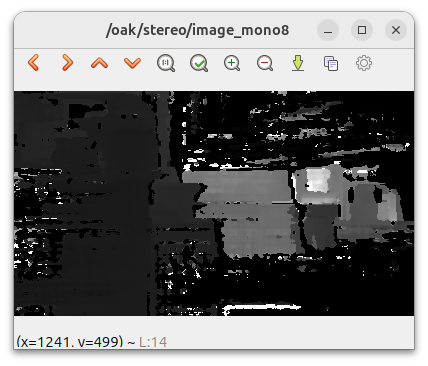
- Same trick, now only with dynamic scaling of the depth: convert_oak_depth_image2mono8.py.
- Now ros2 run image_view image_view --ros-args -r image:=/oak/stereo/image_mono8 gives:
- If I have to convert, I could directly color-code it. Have to choose between these COLORMAPs:
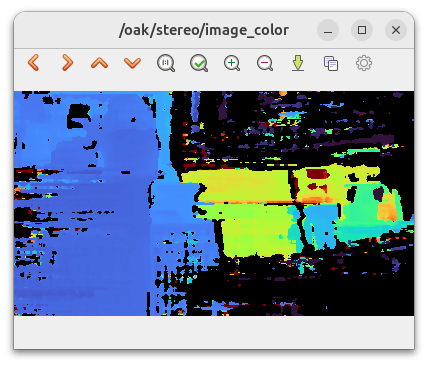
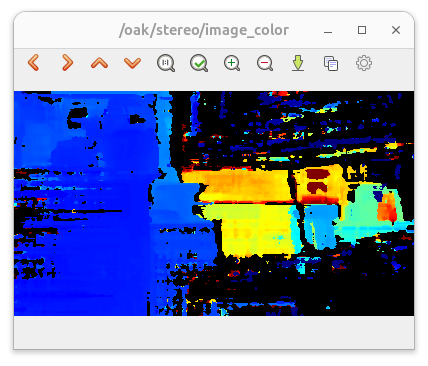
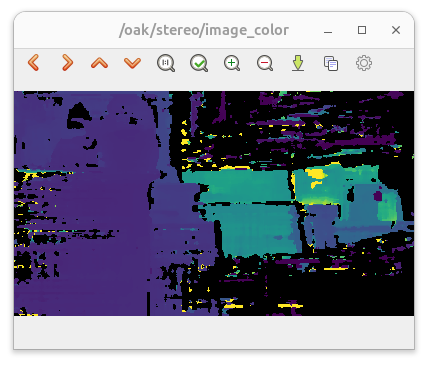
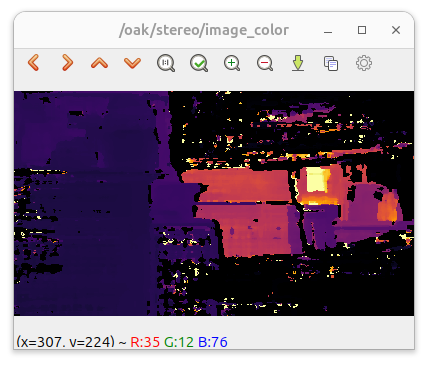
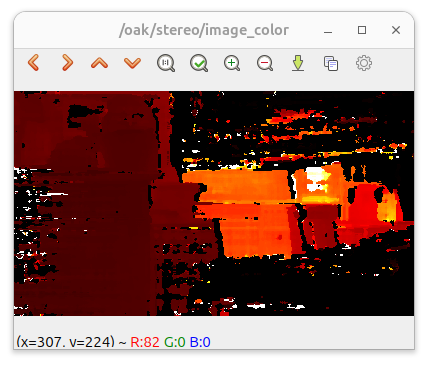
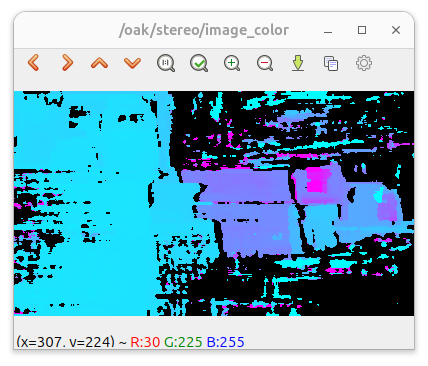
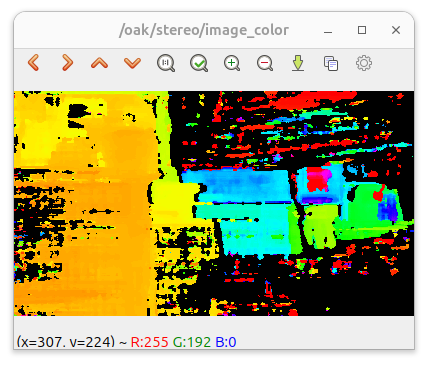
- I like cv2.COLORMAP_JET (2nd image) the best, although cv2.COLORMAP_HSV (lat image) gives a nice warning on nearby objects. convert_oak_depth_image2bgr8.py.
August 21, 2026
- Addison Sears-Collins also has page on obstacle avoidance, but raspberri-pi and sonar based. It is not even ROS-based.
- There is also a multi-obstacle version.
- Addison Sears-Collins also has page on https://automaticaddison.com/calculating-wheel-odometry-for-a-differential-drive-robot>wheel odometry.
- More interesting is how to correct this inside the Navigation Stack, the third tutorial on Nav2, using EKF for sensor-fusion.
- Also nice: Practical Tips for Implementing the 10,000 Experiment Rule:
Here are some practical tips for individuals and organizations looking to embrace this mindset:
- Document Everything: Keep detailed records of each experiment, including the hypothesis, methodology, results, and learnings. This documentation is invaluable for tracking progress and informing future experiments.
- Embrace Failure: View each failed experiment as a learning opportunity. Analyzing why an experiment didn’t work is often more informative than a successful outcome.
- Foster a Culture of Curiosity: Encourage team members to ask questions, propose experiments, and explore new ideas. A supportive environment that values curiosity and risk-taking is essential for innovation.
- Leverage Technology: Utilize software and tools designed for managing experiments. These can help organize data, track progress, and analyze results, making the experimentation process more efficient and effective.
-
- Why does ~/ugv_dev_ws's ros2 launch ugv_vision demo.launch.py exe:=cam_webrtc use_rviz:=false requires ros-humble-v4l2-camera, while ros2 launch ugv_vision camera.launch.py use_rviz:=false uses ros-humble-usb-cam.
- Should try ros2 run image_view image_view --ros-args -r image:=/obstacle_avoidance/debug/depth_image, together with the rosbag (and the real robot).
-
- Working on the workstation, which has no ~/ugv_ws installed. Yet, it is a Ubuntu 24.04.4 system, so ROS2 Jazzy is installed.
- Could still be an interesting experiment, to see if the install instructions from the Manual still work.
- There was a conflict between vcstool and python3-vcstool, so had to deinstall sudo apt remove vcstool ros-dev-tools python3-vcstool first, before Icould do sudo apt install ros-dev-tools
- Did naturally sudo apt install ros-jazzy-desktop instead of humble.
- The /opt/ros/jazzy/setup.bash was already installed for ~/bookros2_ws.
- Tried sudo apt-get install ros-${ROS_DISTRO}-nav2-msgs ros-${ROS_DISTRO}-map-msgs, which worked.
- Installing sudo apt-get install ros-${ROS_DISTRO}-* installs also the -v3 versions.
- Could do sudo apt-get remove ros-jazzy-depthai-descriptions-v3 ros-jazzy-depthai-ros-msgs-v3-dbgsym ros-jazzy-depthai-examples-v3-dbgsym ros-jazzy-depthai-v3-dbgsym ros-jazzy-depthai-ros-driver-v3-dbgsym ros-jazzy-depthai-ros-v3 ros-jazzy-depthai-examples-v3 ros-jazzy-depthai-bridge-v3 ros-jazzy-depthai-filters-v3-dbgsym ros-jazzy-depthai-v3 ros-jazzy-depthai-filters-v3 ros-jazzy-depthai-ros-msgs-v3 ros-jazzy-depthai-bridge-v3-dbgsym ros-jazzy-depthai-ros-driver-v3.
- Instead, did sudo apt-get remove ros-${ROS_DISTRO}-nav2-msgs ros-${ROS_DISTRO}-map-msgs, and tried if sudo apt-get install ros-${ROS_DISTRO}-depthai-ros-driver is enough.
- Checked, only in ugv_vision there seems to be dependency on depthai-ros-driver.
-
- For ROS Jazzy, explore_lite cannot be build:
~/ugv_ws/src/ugv_else/explore_lite/src/explore.cpp: In member function ‘void explore::Explore::resume()’:
~/ugv_ws/src/ugv_else/explore_lite/src/explore.cpp:414:37: error: no matching function for call to ‘rclcpp::TimerBase::execute_callback()’
414 | exploring_timer_->execute_callback();
| ~~~~~~~~~~~~~~~~~~~~~~~~~~~~~~~~~~^~
/opt/ros/jazzy/include/rclcpp/rclcpp/timer.hpp:124:3: note: candidate: ‘virtual void rclcpp::TimerBase::execute_callback(const std::shared_ptr&)’
124 | execute_callback(const std::shared_ptr & data) = 0;
| ^~~~~~~~~~~~~~~~
/opt/ros/jazzy/include/rclcpp/rclcpp/timer.hpp:124:3: note: candidate expects 1 argument, 0 provided
gmake[2]: *** [CMakeFiles/explore.dir/build.make:90: CMakeFiles/explore.dir/src/explore.cpp.o] Error 1
- Skipped for the moment.
- Next one that fails is slam_gmapping:
In file included from ~/ugv_ws/src/ugv_else/gmapping/slam_gmapping/src/slam_gmapping.cpp:24:
~/ugv_ws/src/ugv_else/gmapping/slam_gmapping/include/slam_gmapping/slam_gmapping.h:38:10: fatal error: tf2_geometry_msgs/tf2_geometry_msgs.h: No such file or directory
38 | #include "tf2_geometry_msgs/tf2_geometry_msgs.h"
| ^~~~~~~~~~~~~~~~~~~~~~~~~~~~~~~~~~~~~~~
compilation terminated.
- That is an old ROS1 call, in ROS2 (Humble, Jazzy or newer) it should be tf2_geometry_msgs/tf2_geometry_msgs.hpp. That could be easily repaired. Compiles now fine, although with some warnings.
- All ugv_* packages compile without warnings.
- Downloaded obstacle,mcap and run ros2 bag play --storage mcap 10/10_0.mcap
- Running ros2 run image_view image_view --ros-args -r image:=/obstacle_avoidance/debug/depth_image gives:
[ERROR] [1787332440.106618845] [image_view_node]: Unable to convert '16UC1' image for display: 'cv_bridge.cvtColorForDisplay() does not have an output encoding that is color or mono, and has is bit in depth'
- Tried ros2 run image_view image_view --ros-args -r _image_transport:=compressed -r image:=/obstacle_avoidance/debug/roi_image, but no image.
- Also rviz2 fails to show an image, due to:
Possible reasons are listed at http://wiki.ros.org/tf/Errors%20explained
[WARN] [1787332973.815685829] []: TF_OLD_DATA ignoring data from the past for frame base_footprint at time 1787056863.428966 according to authority Authority undetectable
- Doing it a 2nd time, starting rviz2 fresh, and setting the debug/roi_image QoS to 'Best effort' I got an image.
August 20, 2026
- Joey provided the mcap recording of the obstacle avoidance.
- The mcap was recorded with option ros2 bag record -s mcap, which only works when sudo apt install ros-humble-rosbag2-storage-mcap is installed.
- The rosbag2_storage_mcap code can be found on github. The humble branch is 123 commits ahead and 453 commits behind rolling.
- Did ros2 bag play -s mcap 10_0.mcap, with ros2 topic echo /obstacle_avoidance/state in another terminal.
-
- Writing on Assignment 1. Line detection was in Peter Corke's Chapter 11 notebook. No Obstacle Avoidance in Szelinski's index.
- Obstacles appear on several places in Dudek's book, most interesting is the reactive behavior described in Chapter 8.
- Peter Corke covers reactive control in Section 5.1. The chapter 5 notebook only shows a path planned for the Bug2 algorithm.
-
- Looking at vision doc. Trying ros2 launch ugv_vision demo.launch.py exe:=oak_color_ball_track use_rviz:=false is not part of ~/ugv_ws, so compiled colcon build --cmake-args -Wno-dev --packages-select ugv_vision.
- The oak_color_ball_track-node crashes on missing ~/ugv_dev_ws/install/ugv_vision/lib/python3.10/site-packages/ugv_vision/Mediamtx/ to create there mediamtx.log
- Failed on starting child_process ~/ugv_dev_ws/install/ugv_vision/lib/python3.10/site-packages/ugv_vision/Mediamtx/mediamtx (line 55 of oak_color_ball_track.py).
- MediaMTX is a ready-to-use and zero-dependency live media server and media proxy that allows to publish, read, proxy, record and playback real-time video and audio streams.
- Finally was able to get mediamtx working. Downloaded curl -fsSLO "https://github.com/bluenviron/mediamtx/releases/download/v1.20.1/mediamtx_v1.20.1_linux_arm64.tar.gz"
- Unpacked the executable with tar xvlf mediamtx_v1.20.1_linux_arm64.tar.gz. Copied the exutable to ~/ugv_dev_ws/install/ugv_vision/lib/python3.10/site-packages/ugv_vision/Mediamtx/.
- Next is error in the oak_color_ball_track is missing gst-launch-1.0
- That can be solved with install gstreamer
-
- Still ros2 launch ugv_vision demo.launch.py exe:=oak_color_ball_track use_rviz:=false fails on:
[oak_color_ball_track-8] node = OakYoloNode()
[oak_color_ball_track-8] File "/home/ws/ugv_dev_ws/install/ugv_vision/lib/python3.10/site-packages/ugv_vision/oak_color_ball_track.py", line 146, in __init__
[oak_color_ball_track-8] self.create_pipeline()
[oak_color_ball_track-8] File "/home/ws/ugv_dev_ws/install/ugv_vision/lib/python3.10/site-packages/ugv_vision/oak_color_ball_track.py", line 185, in create_pipeline
[oak_color_ball_track-8] xoutRgb = pipeline.create(dai.node.XLinkOut)
[oak_color_ball_track-8] AttributeError: module 'depthai.node' has no attribute 'XLinkOut'
[ERROR] [oak_color_ball_track-8]: process has died [pid 1680, exit code 1, cmd '
-
- Back to basics. Checking the depthai_ros_driver from Luxonis docs.
- Launched ros2 launch depthai_ros_driver_v3 driver.launch.py
- There were some error messages, but I could inspect the published topics.
- Still, the question is to use depthai_ros_driver or driver_v3.
- Looked at obstacle avoidance models at roboflow. One that has only an obstacle class is obstacle, but wasn't able to find a prediction for my black_obstacle.png.
- Some obstacles were found by this model.
- One that works quite fine on the Rover (but not on the box): voitures
- Another project which recognize the Rover as an robot is model_id="proj3-swudh/1".
- Created a inference_roboflow_robot.py which uses the InferenceHTTPClient to recognize the image.
-
- Started from vision the WebRTC preview with ros2 launch ugv_vision demo.launch.py exe:=cam_webrtc use_rviz:=false. Failed on missing v4l2_camera package. Installed apt-get install -y \
ros-humble-v4l2-camera \
v4l-utils
- One of the nodes is [v4l2_camera_node-8]. Gives the warning:
[v4l2_camera_node-8] [WARN] [1787238045.280083501] [v4l2_camera]: Image encoding not the same as requested output, performing possibly slow conversion: yuv422_yuy2 => rgb8
- The node [cam_webrtc-10] WARNING: erroneous pipeline: no element "rtspclientsink"
- The code roboflow_detector.py seems to work, but when I move the robot no images are published.
- OK, removed the monitor and charger before moving the robot.
- Started simply ros2 launch ugv_vision camera.launch.py use_rviz:=false
- Now I get the topic ros2 topic echo /roboflow/detections:
detections:
- header:
stamp:
sec: 1787240659
nanosec: 390526000
frame_id: pt_camera_link
results:
- hypothesis:
class_id: robot
score: 0.9875230193138123
- Looked with ros2 run image_view image_view --ros-args -r image:=/image_raw to the image. Lot of sun-light, blinds didn´t go down.
August 18, 2026
- Continuing with Experimental
- Yesterday a Llama-server was missing, so trying ollama run llama3.2:1b from UGV Rover PI ROS2.
- Running ollama run llama3.2:1b downloaded a model and gave a prompt. Did several /show info commands. Tried quit instead of /bye, which gave the response of LLama If you're feeling overwhelmed or need to take a break, it's okay to step
away. Would you like to talk about what's on your mind or is there
something else I can help you with?.
- The UGV Rover PI ROS2 tutorial actually recomended the 9B gemma2 model, so did ollama run gemma2.
- All other models fail with the ollama-server loading the llama-server, ollama run llama3.2:1b works fine.
- Modified in ugv_chat_ai the ip and model, and tried colcon build --cmake-args -Wno-dev --packages-select ugv_msgs ugv_chat_ai. Got the #include again. Could possibly solved with sudo apt install python3-dev, but the real error was that I was on nb-dual instead of inside the container. There the compilation worked.
- Started ros2 launch ugv_bringup bringup_lidar.launch.py use_rviz:=false. Got a [ugv_bringup-3] JSON decode error: Expecting value: line 1 column 1 (char 0) with line: ,"gz":-7,"mx":-149,"my":473,"mz":1215,"odl":0,"odr":0,"v":1181}, but process didn´t die.
- Started ros2 run ugv_chat_ai app. The server is up, but gives jinja2.exceptions.TemplateNotFound: index.html.
- There is an index.html at ugv_chat_ai/templates, which has an imput-form with "Type your message..."
- Note that we have now two versions of ugv_chat_ai: one in ugv_ws and one in ugv_dev_ws. Should put a COLCON_IGNORE in the ugv_ws version (together with ugv_msgs, which is also double.
- Added both COLCON_IGNORES, did:
# unset CMAKE_PREFIX_PATH
# unset AMENT_PREFIX_PATH
# source install/setup.bash
# colcon build --cmake-args -Wno-dev --packages-select ugv_base_node ugv_interface ugv_bringup ugv_description ugv_gazebo ugv_nav ugv_slam ugv_tools ugv_vision ugv_web_app --executor sequential
- Both programmes are looking for the ./templates directory in install/ugv_chat_ai/lib/python3.10/site-packages/ugv_chat_ai/templates.
- Also install/ugv_chat_ai/lib/python3.10/site-packages/ugv_chat_ai/prompt.txt is missing
- In ugv_dev_ws, I added in setup.py:
package_data={
package_name: [
"templates/*.html",
"static/*.css",
"static/*.js",
"static/images/*",
],
},
include_package_data=True,
- That sort of works:
# Package would be ignored #
############################
Python recognizes 'ugv_chat_ai.templates' as an importable package,
but it is not listed in the `packages` configuration of setuptools.
'ugv_chat_ai.templates' has been automatically added to the distribution only
because it may contain data files, but this behavior is likely to change
in future versions of setuptools (and therefore is considered deprecated).
Please make sure that 'ugv_chat_ai.templates' is included as a package by using
the `packages` configuration field or the proper discovery methods
(for example by using `find_namespace_packages(...)`/`find_namespace:`
instead of `find_packages(...)`/`find:`).
You can read more about "package discovery" and "data files" on setuptools
documentation page.
- At least ugv_dev_ws/install/ugv_chat_ai/lib/python3.10/site-packages/ugv_chat_ai/templates/index.html exists.
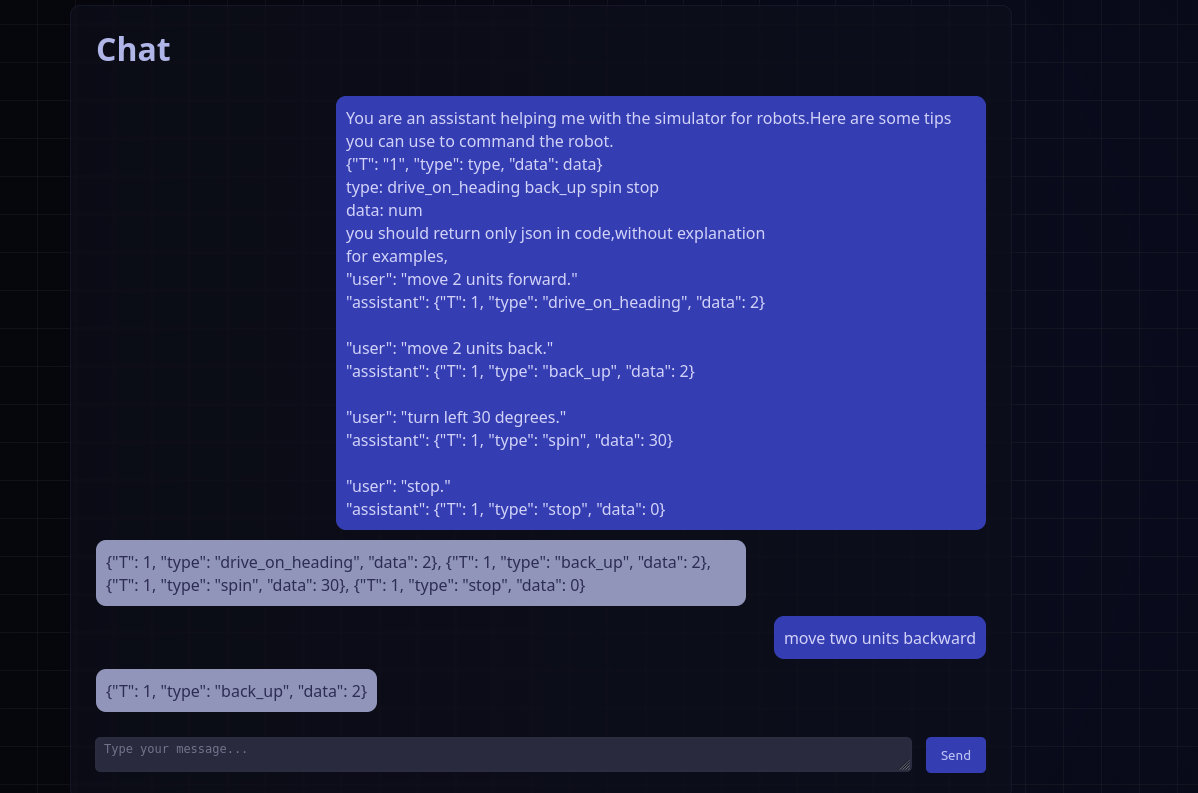
- The webserver is now there. Giving the chat-prompt:
You are an assistant helping me with the simulator for robots.Here are some tips you can use to command the robot.
{"T": "1", "type": type, "data": data}
type: drive_on_heading back_up spin stop
data: num
you should return only json in code,without explanation
for examples,
"user": "move 2 units forward."
"assistant": {"T": 1, "type": "drive_on_heading", "data": 2}
"user": "move 2 units back."
"assistant": {"T": 1, "type": "back_up", "data": 2}
"user": "turn left 30 degrees."
"assistant": {"T": 1, "type": "spin", "data": 30}
"user": "stop."
"assistant": {"T": 1, "type": "stop", "data": 0}
- Gives:
Server request error: HTTPConnectionPool(host='127.0.0.1', port=11434): Max retries exceeded with url: /api/chat (Caused by NewConnectionError(': Failed to establish a new connection: [Errno 111] Connection refused'))
- Directly giving this hints in llama3.2:1b gives the assistance response:
{
"T": 1,
"type": "drive_on_heading",
"data": 2
}
{
"T": 1,
"type": "back_up",
"data": 2
}
{
"T": 1,
"type": "spin",
"data": 30
}
{
"T": 1,
"type": "stop",
"data": 0
}
- After this hint, it gives the right response, also for slightly other commands like >>> move two units backward
{
"T": 1,
"type": "back_up",
"data": 2
}
- Finally, I found the working configuration. The trick was to set at the ollama-server side (I did both the server and run-terminal) export OLLAMA_HOST=":11434", before the two start commands are given.
- On the other side ros2 run ugv_chat_ai app --ros-args -p server_url:=http://146.50.60.58:11434/api/chat.
- Now the connection is made. Also started ros2 run ugv_tools behavior_ctrl and the robot starts moving:
-
- Also tried AUDIODEV=plughw:1,0 ros2 run ugv_voice voice_chat --ros-args -p language:=en -p server_url:=http://146.50.60.58:11434/api/chat
- Activated the listening with ros2 topic pub /kws std_msgs/Bool "{data: true}" --once
- UGV Rover responded with: 'I am listing'
- Gave the voice-command 'Drive forward´, I got:
[INFO] [1787069022.968206667] [voice_chat]: ASR: WIFE FORWARD
...
[INFO] [1787069037.481417599] [voice_chat]: LLM: llm model request failed: 500 Server Error: Internal Server Error for url: http://146.50.60.58:11434/api/chat
- Strange, because this url worked with the app
August 17, 2026
- New ROS2 book: ROS 2: Zero to Robot. Should check Chapter 9 onwards.
-
- Continuing with Experimental
- Repairing the ASR-pipeline.
- In audio_capture() I added:
audio_device = os.environ.get('AUDIODEV')
if audio_device == 'None':
audio_device = "plughw:2,0" # original setting of code
print("Using as microphone device: ", audio_device)
cmd = [
"arecord",
"-D", audio_device,
"-f", "S16_LE",
"-c", "1",
"-r", "16000",
"-t", "raw",
]
- In ~/ugv_dev_ws I did colcon build --cmake-args -Wno-dev --packages-select ugv_voice.
- Don´t forget source install/setup.bash
- Called AUDIODEV=plughw:1,0 ros2 run ugv_voice voice_ctrl --ros-args -p language:=en. Got a RuntimeError: No graph was found in the protobuf. This means that onnx model is missing again. It is still in /home/ws/ugv_dev_ws/src/ugv_main/ugv_voice/ugv_voice/models/asr/silero_vad.onnx, but code looked in /home/ws/ugv_ws/.
- Rebuild and restarted.
- Gave command ros2 topic pub /asr std_msgs/Bool "{data: true}" --once
- The ASR became active:
[ASR] Start
Using as microphone device: plughw:1,0
[ASR] Run thread started
[ASR] FINAL: THE LOSING
voice reconize THE LOSING
[ASR] FINAL: THE FOIL
voice reconize THE FOIL
[ASR] FINAL: START
voice reconize START
[ASR] FINAL: AND
voice reconize AND - Said END
[ASR] FINAL: IT WAS
voice reconize IT WAS - Said DRIVE
[ASR] FINAL: STOP
voice reconize STOP
- The list of tokens.txt from ASR is quite long (502 lines).
- Code is based on this github, with documentation. The model is described here, although it is not clear how large the CORPUS should be.
- The command ros2 topic pub /tts std_msgs/String "{data: 'Hello robot'}" --once works directly, no modification of code is needed:
[INFO] [1786950070.650875084] [voice_ctrl]: Speech request: Hello robot
Audio saved to /home/ws/ugv_ws/tts_en.wav
-
- Next would be voice-chat, which needs a ollama server started.
- Installed ifconfig with sudo apt install net-tools.
- The ollama_llm_chat.py script uses an explicit ip. Could better use 127.0.0.1. But it just connect to the ollama-server, not starts it.
- Found some waveshare-ollama documentation for the UGV Rover PI ROS2.
- In the documentation the ollama-server was installed on a Windows machine, but curl -fsSL https://ollama.com/install.sh | sh also works for the arm64 architecture of the Rover:
Downloading ollama-linux-arm64-jetpack6.tar.zst
>>> Creating ollama systemd service...
WARNING: systemd is not running
>>> NVIDIA JetPack ready.
>>> The Ollama API is now available at 127.0.0.1:11434.
- Indeed, just running ollama didn´t work, yet, ollama serve does.
- Tried ros2 run ugv_voice voice_chat \
--ros-args \
-p language:=en \
-p server_url:=http://127.0.0.1:11434/api/chat, complains that there is no /home/ws/ugv_dev_ws/install/ugv_voice/lib/python3.10/site-packages/ugv_voice/../config/voice_config.yaml. Indeed, the config is installed in /home/ws/ugv_dev_ws/install/ugv_voice/share/ugv_voice/config/voice_config.yaml
- Made the configuration loaded from the installed location with following code:
from ament_index_python.packages import get_package_share_directory
from pathlib import Path
package_dir = Path(get_package_share_directory("ugv_voice"))
config_path = os.path.join(package_dir, "config/voice_config.yaml")
- Now I got again a device error:
pygame.error: ALSA: Couldn't open audio device: No such file or directory. This can be solved with a environment variable:
AUDIODEV=plughw:1,0 ros2 run ugv_voice voice_chat --ros-args -p language:=en -p server_url:=http://127.0.0.1:11434/api/chat
- Made a symbolic link in ~/ugv_dev_ws/install/ugv_voice/share/ugv_voice/ to the models directory in src, and added models/llm/prompt.txt.
- Again a step further, it now fails in ASR on sherpa_ncnn/recognizer.py trying to load the Chinese model, while the language on the command-line was English.
- The LANG_CONFIG is nicely defined at the beginning of the code. For the asr_model for both languages the same model is used: "sherpa-ncnn-streaming-zipformer-bilingual-zh-en-2023-02-13"
- With sherpa-ncnn-streaming-zipformer-20M-2023-02-17 the program starts. Yet, don´t hear a wake_prompt.
- Send ros2 topic pub /kws std_msgs/Bool "{data: true}" --once which gave the wake_prompt "I'm listening".
- Starting KWS also started ASR:
[INFO] [1786970904.096623368] [voice_chat]: /kws wake trigger
Audio saved to /home/ws/ugv_ws/tts_en.wav
Aborted by signal Terminated...
arecord: pcm_read:2221: read error: Interrupted system call
[ASR] Start
Using as microphone device: plughw:1,0
[ASR] Run thread started
[INFO] [1786970906.083562505] [voice_chat]: Start ASR
Recording raw data 'stdin' : Signed 16 bit Little Endian, Rate 16000 Hz, Mono
[ASR] FINAL: START
[INFO] [1786970911.036434075] [voice_chat]: ASR: START
[INFO] [1786970911.059365697] [voice_chat]: LLM: llm model request failed: 404 Client Error: Not Found for url: http://127.0.0.1:11434/api/chat
[ASR] Stop
Aborted by signal Terminated...
arecord: pcm_read:2221: read error: Interrupted system call
Using as microphone device: plughw:1,0
[INFO] [1786970925.080179686] [voice_chat]: Wakeup flow finished
- From the ollama server-side I see indeed:
[GIN] 2026/08/17 - 20:48:31 | 404 | 5.942008ms | 127.0.0.1 | POST "/api/chat"
- Installed brave-browser on the jetson (outside the docker).
- Looking for api/chat on the jetson with the browser gave a 405 error.
- Three ways out of this:
- Install the qwen3:8b model
- Make sure that the systemd is running inside the container
- Run the ollama server runs on my laptop, instead of the jetson.
- Kept the ollama server running, and gave in another terminal the command ollama run qwen3:8b. That looks good, the ollama-server responded with ownloading a3de86cd1c13 in 16 326 MB part(s). (5.2 Gb)
- Yet, once installed, it gave the error:
load_tensors: loading model tensors, this can take a while... (load_mode = dio)
load_tensors: offloading 0 repeating layers to GPU
load_tensors: offloaded 0/37 layers to GPU
load_tensors: CPU model buffer size = 4977.62 MiB
time=2026-08-17T21:16:24.747+08:00 level=INFO source=llama_server.go:1350 msg="waiting for llama-server to become available" status="llm server not responding"
time=2026-08-17T21:16:25.469+08:00 level=INFO source=sched.go:641 msg="Load failed" model=/home/ws/.ollama/models/blobs/sha256-a3de86cd1c132c822487ededd47a324c50491393e6565cd14bafa40d0b8e686f error="llama-server process has terminated: signal: killed"
August 14, 2026
- OpenCV has now a OpenCV AI Competition 2026, with Visual SLAM as one of the suggested project areas. Should be Cloud-Optimized Vision with COOL.
-
- Looking at the voice_ctrl pipeline I have build up. The kws has a small keywords.txt, with wake words like 'Hi Google', 'Hey Siri', 'Alexa'.
-
- But first look if not only the speaker, but also the microphone work. Started voice_ctrl with SDL_AUDIODRIVER=alsa AUDIODEV=plughw:1,0 ros2 run ugv_voice voice_ctrl.
- Doing a 5 second recording with arecord -D plughw:1,0 \
-f S16_LE \usb_connected = False
-r 16000 \
-c 1 \ self.usb_connected = True
-d 5 \ 84,9 39%
/tmp/mic-test.wav and playing it back with aplay -D plughw:1,0 /tmp/mic-test.wav worked fine.
- Looked into the code. In principle there are already prints when Keywords are spotted.
- Added a print-statement: KWS is not enabled!
- The voice_ctlr documentation indicates that sub-features can be controlled with ros2 topic pub /kws std_msgs/Bool "{data: true}" --once.
Indeed, now I get [INFO] [1786718440.872718184] [voice_ctrl]: KWS start, directly followed by arecord: main:831: audio open error: No such file or directory.
- Looked into kws_sherpa_onnx.py. Here explicit the device "plughw:2,0" instead of "plughw:1,0" is used (or even better AUDIODEV)
- Implemented the AUDIODEV version. Now I get:
[INFO] [1786719937.937962859] [voice_ctrl]: KWS start
Using as microphone device: plughw:1,0
Recording raw data 'stdin' : Signed 16 bit Little Endian, Rate 16000 Hz, Mono
Keyword Spotting True
- Also gave 2nd signal ros2 topic pub /asr std_msgs/Bool "{data: true}" --once.
- Same problem:
[INFO] [1786720128.253006937] [voice_ctrl]: ASR start
[ASR] Start
[ASR] Run thread started
arecord: main:831: audio open error: No such file or directory
- Same solution will work (next time).
- pygame tries to write some log in my home-directory. The container doesn´t know the original user (1000). Changing it to root gives problems outside the container. Not sure if defining the original user in the container would work. The home-directory is now available, so pygame seems to use a subdirectory.
August 13, 2026
- Started again with Rover #2.
- Inside the container, there was a lot of double commands at the end.
- Added those 4 lines from October 10, 2025 at the end:
export ROS_DOMAIN_ID=2
export HOME=/home/ws
source $HOME/ugv_ws/install/setup.bash
source $HOME/.bashrc
- Still an error message:
not found: "/home/ws/ugv_ws/install/teb_local_planner/share/teb_local_planner/local_setup.bash"
- Trying colcon build --packages-select teb_local_planner, which fails on missing g2o includes. Did sudo apt-get install ros-humble-libg2o from October 27, 2025.
- The build script failed, without explicit error. Tried the command colcon build --cmake-args -Wno-dev --packages-select ldlidar rf2o_laser_odometry robot_pose_publisher teb_msgs --executor sequential from build_common.sh.
- This fails on The build time path "/home/jetson/ugv_ws/install/costmap_converter_msgs" doesn't exist. in teb_msgs.
- Strange, no explicit reference to /home/jetson. Removed ~/ugv_ws/build/teb_msgs, but /home/ws/ugv_ws/build/teb_msgs/colcon_command_prefix_build.sh comes back.
- Starting with colcon clean workspace -y
- Next colcon build --cmake-args -Wno-dev --packages-select cartographer costmap_converter_msgs explore_lite --executor sequential : Summary: 3 packages finished
- Also colcon build --cmake-args -Wno-dev --packages-select openslam_gmapping slam_gmapping --executor sequential works.
- Now colcon build --cmake-args -Wno-dev --packages-select ldlidar rf2o_laser_odometry robot_pose_publisher teb_msgs --executor sequential also succeeds, colcon clean workspace -y did the trick.
- Now 11 packages: colcon build --cmake-args -Wno-dev --packages-select ugv_base_node ugv_interface ugv_bringup ugv_chat_ai ugv_description ugv_gazebo ugv_nav ugv_slam ugv_tools ugv_vision ugv_web_app --executor sequential Summary: 11 packages finished.
- First chmod +x ~/ugv_ws/src/ugv_else/vizanti/vizanti_server/scripts/*.py
- Now colcon build --cmake-args -Wno-dev --packages-select vizanti vizanti_cpp vizanti_demos vizanti_msgs vizanti_server --executor sequential
- Building gives every time WARNING:colcon.colcon_ros.prefix_path.catkin:The path '/home/ws/ugv_ws/install/apriltag' in the environment variable CMAKE_PREFIX_PATH doesn't exist.
- sudo apt install libopencv-dev=4.5.4+dfsg-9ubuntu4 from build_apriltag,sh was not needed, already installed.
- Last colcon build --cmake-args -Wno-dev --packages-select apriltag apriltag_msgs apriltag_ros --executor sequential Summary: 3 packages finished
-
- OK, trying bringup tutorial.
- Doing ros2 launch ugv_bringup bringup_lidar.launch.py use_rviz:=false.
- See warnings:
[rf2o_laser_odometry_node-6] [WARN] [1786609668.755448906] [rcl.logging_rosout]: Publisher already registered for provided node name. If this is due to multiple nodes with the same name then all logs for that logger name will go out over the existing publisher. As soon as any node with that name is destructed it will unregister the publisher, preventing any further logs for that name from being published on the rosout topic.
[robot_state_publisher-1] [WARN] [1786609668.764682008] [ugv.robot_state_publisher]: No robot_description parameter, but command-line argument available. Assuming argument is name of URDF file. This backwards compatibility fallback will be removed in the future.
[rf2o_laser_odometry_node-6] [INFO] [1786609669.101472224] [rf2o_laser_odometry]: Got first Laser Scan .... Configuring node
[ugv_bringup-3] JSON decode error: Extra data: line 1 column 2 (char 1) with line: 08,"gx":-9,"gy":9,"gz":-5,"mx":-139,"my":439,"mz":1267,"odl":0,"odr":0,"v":1190}
- Next tutorial: https://github.com/waveshareteam/ugv_ws/blob/ros2-humble-develop-251125/docs/teleoperation.md. In T1 (in container) I did: ros2 run ugv_tools keyboard_ctr. Could drive robot forward.
- Did the same from nb-dual, could drive forward.
- Also rviz2 started up nicely, already with the robot-description and LaserScan.
-
- Next action-commands from experimental
- Inside the container, created a ~/ugv_dev_ws by git clone -b ros2-humble-develop-251125 https://github.com/waveshareteam/ugv_ws.git (via a tmp-directory)
- Copied ugv_main/ugv_msgs to ~/ugv_ws and did colcon build --cmake-args -Wno-dev --packages-select ugv_msgs.
- Got several warnings on WARNING:colcon.colcon_ros.prefix_path.ament:
The path '/home/ws/ugv_ws/install/yahboom_rosmaster'
The path '/home/ws/ugv_ws/install/oakdlite_camera'
The path '/home/ws/ugv_ws/install/marker_detection'
The path '/home/ws/ugv_ws/install/line_follower'
The path '/home/ws/ugv_ws/install/emcl2' - Strange, should be there
The path '/home/ws/ugv_ws/install/costmap_converter' - Strange, should be there
The path '/home/ws/ugv_ws/install/yahboom_rosmaster'
-
- Started in T1 ros2 run ugv_tools behavior_ctrl .
- Checked in T2 ros2 interface show ugv_msgs/action/Behavior OK
- Checked in T2 ros2 action list | grep behavior OK
- Yet, ros2 action send_goal /behavior ugv_msgs/action/Behavior \ "{command: '[{\"type\": \"drive_on_heading\", \"data\": 0.5}]'}" --feedback gives:
Waiting for an action server to become available...
-
- Looking at the two behavior_ctrl.py in ugv_ws and ugv_dev_ws. Quite a difference, ugv_dev_ws has much more code.
- Moved the behavior_ctlr to ugv_ws (saving behavior_ctrl.old). Now the script gives:
[INFO] [1786613825.139621589] [behavior_ctrl]: Migrated 2 points from /home/ws/ugv_ws/map_points.txt to /home/ws/ugv_ws/map_points.json
- Still no 'Waiting for an action server to become available...'
- Check if the server is actual there with ros2 service list --include-hidden-services | grep '/behavior/_action'
/behavior/_action/cancel_goal
/behavior/_action/get_result
/behavior/_action/send_goal
- This was due to a wrong format of the command. An empty command ros2 action send_goal /behavior ugv_msgs/action/Behavior '{}' --feedback gave a reponse:
Sending goal:
command: ''
Goal accepted with ID: 810b794684cd45dfbb1ebadf59e3875f
Result:
result: false
message: 'Invalid command JSON: Expecting value: line 1 column 1 (char 0)'
- The send_goal documentation can be found here.
- Tried ros2 action send_goal /behavior ugv_msgs/action/Behavior "{command: '["type": "drive_on_heading", "data": 0.5]'}" --feedback, which gave:
Sending goal:
command: '[type: drive_on_heading, data: 0.5]'
Goal accepted with ID: 691dd6ae4c67403aa3a0c4e28751b4da
Result:
result: false
message: 'Invalid command JSON: Expecting value: line 1 column 2 (char 1)'
- Chat suggested ros2 action send_goal /behavior ugv_msgs/action/Behavior \
"{command: '{\"type\": \"drive_on_heading\", \"data\": 0.5}'}" \
--feedback, which indeed moved the robot:
Sending goal:
command: '{"type": "drive_on_heading", "data": 0.5}'
Feedback:
feedback: true
status: queued
progress: 0.0
Goal accepted with ID: a86674f283804742844da11c8df33226
Feedback:
feedback: true
status: drive_on_heading:0.00/0.50m
progress: 0.0
Feedback:
feedback: true
status: drive_on_heading:0.00/0.50m
progress: 0.00999999139457941
...
Feedback:
feedback: true
status: drive_on_heading:0.48/0.50m
progress: 0.959850013256073
Feedback:
feedback: true
status: done
progress: 1.0
Result:
result: true
message: ok
Goal finished with status: SUCCEEDED
- Note that the rover was lifted from the table, so no lidar or IMU odometry, just turning of the wheels.
- The difference are the square brackets.
-
- The USB to Audio has arrived (13x).
- Unfortunately, with out 8Ω 5W Speaker.
- Actually, nor a speaker, nor a microphone is needed for the Jetson.
- Tested the speakers (Digital Output S/PDIF). Both Front Left and Right work. The two other options (Speakers - USB PnP Audio Device and Analog Output - Build in Audio) didn't gave any sound.
- There is also the Microphone from the USB-camera, which works.
- Also Digital Input (S/PDIF) - USB-camera works.
- Even Digital Input (S/PDIF) - USB PnP Audio Device works (USB-to-Audio not connected)
- Also Microphone - USB PnP Audio Device works (USB-to-Audio not connected)
- Only the Analog inpu - Build-in Audio doesn't work.
- Looking at the USB to Audio wiki, the microphone volume bar is not there. One of the FAQ.
-
- Going to section voice-control
- Voice control does NOT /cmd_vel.
- Inside ~/ugv_dev_ws I did colcon build --cmake-args -Wno-dev --packages-select ugv_voice. That is the only package build there (until now), so could do source ~/ugv_dev_ws/install/setup.bash.
- The command ros2 run ugv_voice voice_ctrl --ros-args -p language:=en can now be called, but fails on missing module pyttsx3.
- The module is in requirements.txt, which is called with build_first.sh. Note also the APT_PREFS=/etc/apt/preferences.d/block-gazebo-classic in build_first.sh. Also several function to purge_gazebo versions.
- Did simply python3 -m pip install pyttsx3==2.99.
- sherpa_onnx==1.12.28 was not available in the container, so did python3 -m pip install sherpa_onnx==1.12.28.
- Next python3 -m pip install sherpa_ncnn==2.1.15
- Also python3 -m pip install soundfile==0.13.1
- All packages now installed, but voice_ctlr.py loads relative its src directory, not its install: /home/ws/ugv_dev_ws/install/ugv_voice/lib/python3.10/site-packages/ugv_voice/../config/voice_config.yaml instead of install/ugv_voice/share/ugv_voice/config/voice_config.yaml.
- Corrected this, so the voice_config is loaded.
- Code now fails on line 31: pygame.mixer.init():
pygame.error: ALSA: Couldn't open audio device: No such file or directory
- The voice_config doesn´t specify the audio-device (yet see typo min_time_bewteen_play)
- Did sudo apt install alsa-utils, which was part of build_first.h
- Tested the different devices listed with aplay -l. speaker-test -D plughw:1,0 -c 2 -t wav works.
- Called AUDIODEV=plughw:1,0 ros2 run ugv_voice voice_ctrl --ros-args -p language:=en, which now breaks a few lines further:
/home/ws/ugv_dev_ws/install/ugv_voice/lib/python3.10/site-packages/ugv_voice/../../../models/kws/sherpa-onnx-kws-zipformer-gigaspeech-3.3M-2024-01-01/tokens.txt does not exist
- The models are not copied, so should make a symbolic link to ./src/ugv_main/ugv_voice/ugv_voice/models/kws/sherpa-onnx-kws-zipformer-gigaspeech-3.3M-2024-01-01/README.md. Made the link, which is now loaded from correct relative path.
- Next fails line 132: self.keyword_spotter = _KeywordSpotter(keywords_spotter_config)
- This fails because the onnx files are still the Git LFS pointers, not the actual onnx-models. (files start with string "version https://...")
- Did sudo apt install git-lfs, followed by git lfs install.
- git lfs pull has to be done from a git-directory, in this case: ~/ugv_dev_ws/src/ugv_main/ugv_voice
- Now voice_ctrl.py fails later, on self.vad = sherpa_onnx.VoiceActivityDetector(
RuntimeError: No graph was found in the protobuf.
- The model is not complete, the model.onnx is missing.
- The pretrained model can be found here. The TTS-model are based on 5 Chinese speakers. There is also English models, but VCTK has no dictionary.
- Downloaded wget https://github.com/k2-fsa/sherpa-onnx/releases/download/tts-models/sherpa-onnx-vits-zh-ll.tar.bz2, voice_ctrl goes further.
- Had to install sudo apt install speech-dispatcher speech-dispatcher-espeak espeak-ng
- Get possitive message:
[INFO] [1786637431.420254481] [voice_ctrl]: Audio USB connected
- Yet, I also get the negative message:
Home directory not accessible: Permission denied
- That message is not from voice_ctrl.py, seems to come from pygame:
pygame 2.6.1 (SDL 2.28.4, Python 3.10.12)
Hello from the pygame community. https://www.pygame.org/contribute.html
- This seems to come from espeak, that tries to write into $HOME.
- namei -l "$HOME" showed that /home/ws was not owned by root, but user 1000. Did chown root /home/ws and chgrp root /home/ws. Warning is gone.
- Nothing written in $HOME, although I said some words.
August 12, 2026
- Checking Rover-12: it had batteries.
- Also put batteries in Rover-2. See if this rover has the same problem.
- Starting container with source ~/ugv_ws/ros2_humble.sh. When logging in with ssh -p 23 root@ROVER_IP I got several warnings I had not seen with Rover-12:
-bash: warning: setlocale: LC_ALL: cannot change locale (en_US.UTF-8)
not found: "/home/ws/ugv_ws/install/teb_local_planner/share/teb_local_planner/local_setup.bash"
-bash: /root/ugv_ws/install/setup.bash: No such file or directory
- Also vi doesn´t work :-)
- Tried to install vi, yet sudo apt update gave three warnings:
sudo: unable to resolve host ubuntu: Name or service not known
W: An error occurred during the signature verification. The repository is not updated and the previous index files will be used. GPG error: http://mirrors.ustc.edu.cn/ros2/ubuntu jammy InRelease: The following signatures were invalid: EXPKEYSIG F42ED6FBAB17C654 Open Robotics
W: Failed to fetch http://mirrors.ustc.edu.cn/ros2/ubuntu/dists/jammy/InRelease The following signatures were invalid: EXPKEYSIG F42ED6FBAB17C654 Open Robotics
- Had same problem on October 10, 2025.
- The unknown host is because /etc/hostname is still set to ubuntu, while /etc/hosts uses rover-02. Changed the /etc/hostname, no direct effect (should check after reboot).
- Uncommented 10 deb without space. The number of upgradable packages went up from 581 to 899.
- Downloaded the install_additional_ros_humble_packages.sh script. Selected again option 2 (keep current) for the sshd-server.
- Four packages have unmet dependencies:
ros-humble-depthai-ros-driver-v3 : Depends: ros-humble-depthai-v3 (>= 3.7.1) but it is not installed
- Manually installing ros-humble-depthai-v3 failed on trying to overwrite '/opt/ros/humble/include/depthai/build/version.hpp', which
is also in package ros-humble-depthai.
- Looked with dpkg -l | grep depthai. Both ros-humble-depthai-bridge (v2.12.2) and ros-humble-depthai-bridge-v3 (v3.3.0) were installed.
- In the install_additional_ros_humble_packages there is sudo apt-get install ros-humble-usb-cam ros-humble-depthai-* -y.
- Looked at documentation. The OAKD_Lite is rvc2-based. Seems to work also with v3 of the depthai-software. According to Humble documentation, I should use sudo apt install ros-$ROS_DISTRO-depthai-ros-v3
- Many conflicts between both version. Finally was able to remove old ros-humble-depthai.
- Also installed the kept back packages: sudo apt install libcudnn8 libcudnn8-dev libnccl-dev libnccl2. That has the following effect: npacking libcudnn8-dev (8.9.7.29-1+cuda12.2) over (8.9.6.50-1+cuda11.8)
- Also sudo apt-get install ros-humble-depthai-ros-v3 is now installed.
- The launch-file rgbd_pcl.launch.py looks interesting.
- Running ros2 launch depthai_ros_driver_v3 rgbd_pcl.launch.py
- Gives (inside container):
/oak/imu/data
/oak/rgb/camera_info
/oak/rgb/image_raw
/oak/rgb/image_raw/compressed
/oak/rgb/image_raw/compressedDepth
/oak/rgb/image_raw/theora
/oak/rgbd/points
/oak/stereo/camera_info
/oak/stereo/image_raw
/oak/stereo/image_raw/compressed
/oak/stereo/image_raw/compressedDepth
/oak/stereo/image_raw/theora
- The directory /opt/ros/humble/share/depthai_ros_driver_v3/launch/ has multiple launch files:
calibration.launch.py __pycache__
driver_as_part_of_a_robot.launch.py rgbd_pcl.launch.py
driver.launch.py rtabmap.launch.py
example_multicam.launch.py sr_poe_rgbd_pcl.launch.py
example_segmentation.launch.py sr_rgbd_pcl.launch.py
oak_t.launch.py stereo_from_rosbag.launch.py
pointcloud.launch.py vio.launch.py
- The other two directories with launch files are:
/opt/ros/humble/share/depthai_descriptions_v3/launch
/opt/ros/humble/share/depthai_filters_v3/launch
August 11, 2026
- Updating the UGV Rover Manual.
- Our ugv_ws github is still 106 commits ahead of Waveshare's github.
- The only recent update is joy_ctrl.py
- There is also a Waveshare development branch, 31 commits ahead.
- One interesting to explore are the recommended combinations, like **Stronger obstacle avoidance** *(enough CPU)* | `… use_localization:=amcl use_localplan:=mppi` (or `teb` / `rpp`)
- Also should explore ugv_basics.md
- Also interesting to look at Installation manual, including the choice for Gazebo.
- Anyway, in this branch they have added 17 docs for 17 modules.
- Should try LiDAR intercation: demo.launch.py — includes bringup + one demo; exe:=lidar_follow, lidar_guard, or lidar_obstacle_avoidance
- Although experimental, maybe funny to start with behavior_ctrl, with or without voice-commands.
- Note that they also have ball-track and April-track examples in vision.
-
- Switched nb-real to Ubuntu-partition. Started up rover-12. The rover connect
ed to ROBOLAB_VAR, but that access-point was not connected to the internet.
- Registered rover-12 to iotroam, to have internet-connection.
- Created a new directory ~/ugv_dev_ws/src and cloned the development-branch with git clone -b ros2-humble-develop-251125 https://github.com/waveshareteam/ugv_ws.git
- Started from the ugv_rover source ~/ugv_ws/ros2_humble.sh. Logged in at the docker-container with ssh -p 23 root@ROVER_IP. The rover had indeed ROS_DOMAIN_ID=12.
- Following Behavior Commmand Control, I started ros2 launch ugv_bringup bringup_lidar.launch.py use_rviz:=false.
- Startup fails on a KeyError (tried 3x).
- Had the same JSON decode error on November 5, 2025, with the recommendation to add some way to clean the JSON-buffers, or add some protection.
- Tried a reboot, still same KeyError.
- Bringup starts with an unexpected error: [ugv_bringup-3] [base_ctrl.feedback_data] unexpected error: device reports readiness to read but returned no data (device disconnected or multiple access on port?)
- Made /home/ws/script/check_is_jetson.py, and it is an ugv_jetson, which uses /dev/ttyTHS1.
- Checked permision on /dev/ttyTHS1. crw-rw---- 1 dialout . Root is part of group dailout.
- Gave additional o+rw permission, now ros2 launch ugv_bringup bringup_lidar.launch.py use_rviz:=false has no feedback error, but still fails on imu.
- Previously I started ros2 launch ugv_bringup bringup_imu_origin.launch.py use_rviz:=false, don´t know why. Trying to reboot again (inside the daemon). That wasn't enough. Trying again a full reboot.
-
- Instead, started ros2 run ugv_bringup ugv_driver (no output), ros2 run ugv_tools behavior_ctrl (output). Now ros2 action list | grep behavior showed /behavior, ros2 action info /behavior showed Action clients: 0; Action servers: 1. Yet, ros2 interface show ugv_msgs/action/Behavior failed, because ugv_msgs is only part of the development branch.
- Also cloned the ugv_dev_ws in the docker, copied the ugv_msgs into ugv_ws and did colcon build --packages-select ugv_msgs.
- Now ros2 interface show ugv_msgs/action/Behavior gives:
string command
---
bool result
string message
---
bool feedback
string status
float32 progress
- Sending command ros2 action send_goal /behavior ugv_msgs/action/Behavior \
"{command: '[{\"type\": \"drive_on_heading\", \"data\": 0.5}]'}" --feedback, but response is Waiting for an action server to become available.... Strange, because the action server seemed active.
- Checked the Data path, all three inputs are there, also the output (/cmd_vel is there.
- Tried ros2 topic pub /cmd_vel geometry_msgs/msg/Twist "{linear: { {x: 1.0}}" -1: no response.
- Tried ros2 launch ugv_bringup bringup_imu_ekf.launch.py use_rviz:=false, no error message. Last message:
[robot_state_publisher-1] [INFO] [1786453218.437815102] [ugv.robot_state_publisher]: got segment right_up_wheel_link
.
- Yet, no ros2 topic pub /cmd_vel geometry_msgs/msg/Twist "{linear: { {x: 1.0}}" -1 gave Waiting for at least 1 matching subscription(s)... . See with ros2 topic list: /cmd_vel. With ros2 topic info /cmd_vel I see one Subscription count: 1
August 6, 2026
- Lingbot-vision outperforms Dino v3. It needs as input RGBD, and outputs refined Depth and Refined point clouds. No ROS2-implementation.
July 24, 2026
- A page with SLAM Tutorials, including SLAM for Dummies, from 2013.
July 22, 2026
- Francisco Martin Rico wrote a new book on Software Architectures for Robots. Currencly only in available in Spanish, soon in English.
- Chapter 3 is focused on Perception and Representation.
- Chapter 5 is about Finite State Machines.
- Chapter 6 is about Behavior Trees.
- Chapter 7 starts with a description of NAV2, PlanSys2 and EasyNav. Nav2 works with Behavior Trees (BT), PlanSys with Planning Domain Definition Language (PDDL). EasyNav works mostly with plugins, for each part of the plan-decide-act cycle (Map, Localize, Plan, Control plugins). EasyNav is also developed at Intelligent Robotics Lab, Spain.
-
- The 2nd part of the book contains of practical tutorials.
- First chapter covers ROS2 basic commands.
- The software can be found at github, starting from the 2nd chapter (publisher / subscribe example).
- The 3rd chapter covers perception, based on both camera and laser observations. Concentrates on the code (C++, no python), the application (obstacle avoidance) less (for instance, no illustrations in this chapter).
- The 5th chapter is based on the Bump-and-Go example with Behavior Trees.
-
- The idea of the 2nd part that it gives directions what should be implemented, but would benefit from some illustration on 'this is how a solution could like'.
- Another remarkable fact that the 241 page book only uses two refences: the two versions of his previous 'Introduction to Robot Programming' book.
-
- Installing a GPU version of opencv-5 is not trivial. See this Tutorial. Key-facts: on Ubuntu 24.04, a pip install still gives version 4.6.0. Even on Ubuntu 26.04 you get a CPU-only version. A Jetpack first-source install is not verified yet.
July 20, 2026
July 16, 2026
- This paper with code teaches a robot a visual map with the phone camera.
- Dataset can be explored with Rerun. No ROS-interface.
July 11, 2026
- Following the instructions from Francisco's textbook no longer works, because it is using the old method via the ros-archive-keyring.gpg.
- Followed the instructions from ROS2 Jazzy install and did it via the ros2-apt-source package.
- Installed ros-jazzy-desktop.
- Had to sudo apt install python3-rosdep before I could do rosdep install --from-paths src --ignore-src -r -y (after a sudo rosdep init ; rosdep update)
- Starting colcon build --symlink-install. The package br2_tracking fails on libopencv_video.so.3.4.4, on LIBAVCODEC.
- Checked br2_tracking. CMakeLists.txt only specifies that opencv is needed (no version), the ObjectDetector only inlcudes opencv2/opencv.hpp.
< i>
Checked the installed versions, which were in principle v4.0.6. Yet, in May 19, 2021 I created a number of symbolic links of libopencv_*.so pointing to version 3.4.4 in /usr/local/lib/. Moved all the links to libopencv_*.so.3, so should not overrule the latest libraries in /usr/lib/x86_64-linux-gnu/.
- Still same error, should define LD_LIBRARY_PATH with x86 earlier.
July 9, 2026
- Luxonis also introduces agent skills for their product.
- Should work both with Claude and Cursor. Skills are available on github.
-
- Looked at the TDP of GentleBots (2024), where the point for the 3D detection boxes with the Tiago to this github code - darknet3d. Example can be found in this ConstructSim interview with a 3D 3D 3D bounding box around Francisco himself.
July 8, 2026
- Francisco Martin Rico's A Concise Introduction to Robot Programming with ROS 2 (2nd edition) is still on my VitalSource Bookshelf.
- On September 19, 2025 I was reading Chapter 7 (Deep ROS2).
- Now starting with Chapter 1, which already contains interesting information such as the naming convention of resources in ROS2, although not for VAR.
- Fig. 1.5 already adds a LiDAR and RGBD to the Kobuki robot, which is Korea’s first robotic turtle (introduced in 2020).
- Yet, in the same chapter Tiago from PAL Robotics is mentioned as platform, which is a modern variant of PR2.
- Tiago is used to create two subsystems, the Behavior subsystem which controls the Head of the Tiago and a Navigation substem.
- In the github code with the book I only see a simultiaon of the Tiago, no Kobuki.
- The pal and tiago packages are loaded via third_parties.repos.
- The humble-branch (Ubuntu 22.04) has no status, for Ubuntu 24.04 both an active Jazzy and Rolling version are available.
- The Construct has a Tiago course, but ROS1 based.
- Finished with Chapter 1 of A Concise Introduction to Robot Programming with ROS 2.
-
- Chapter 2 of A Concise Introduction to Robot Programming with ROS 2 covers the Basics of ROS (the talker example). Quite usefull for the first seminar. No python examples so far as section 2.3. Section 2.3.1 introduces rqt_console tool to filter the log-messages in /rosout.
- Section 2.4 finally introduces the Simulated Robot Setup of the TIAGo. The TAIGo is one of the reference simulator models of ROS2 (Which are the others? At least the Turtlebot). Found no direct list (other than an old ROS1 URDF examples list). UvA AI chat only mentions Husky and Rosbot next to the Turtlebot3. The ROSbot3 from Husarion is quite compatible with the UGV Rover, only Raspberry Pi based and no PanTilt. Yet, it has a OAK-D Lite camra and a SLAMTEC C1 Lidar (and 4 wheels with indeependent quadrature encoders). Would be a good entree to explore its simulation tutorials, including SLAM toolbox + Navigation2.
- Learned that the option --no-arr prevents that you are overloaded with the contents of the array, i.e ros2 topic echo --no-arr /scan_raw
- Now at the end of Chapter 2 also rviz is introduced.
-
- Continue with Chapter 3. That is introducing Finite State Machines with Bump and Go problem. It is a virtual bumber, based on the laser measurements. This chapter has both a c++ and python implementation.
-
- Continue with Chapter 4. That introduces the TF subsystem. Maybe nice to highlight that in the paper. It also highlights the debugging tool Visual Markers, which is part of RVIZ. Instead of checking the distance to an object directly in the FSM, it introduces an obstacle_detector and obstacle_monitor pair. The monitor just points a marker to the object, doesn't react to it (yet).
-
- Chapter 5 will introduces Virtual Force Fields to navigate. It is all still LiDAR based, so it will be interesting to see if that could also be done with vision (obstacle avoidance as assignment 1).
- This chapter also introduces GoogleTest to check the C++-code. Nice, but a bit of a side-line.
- In section 5.2 the objects are tracked, that is where the camera in the head of the Tiago comes in (or the pan-tilt of the UGV Rover). The head is controlled with a PID-controller on the pan-tilt of the neck.
-
- Chapter 6 implements Bump and Go again, but now with a Behavior Tree. Here the testing is actually quite interesting, testing each of the BT nodes seperately.
- In section 6.3 a patrolling Behavior Tree is introduced, that makes use of Nav2 to find a charging system. Although demonstrated on the Tiago, it needs the ros-*-turtlebot3* packages together with the navigation2 packages.
- As assignment, it is suggested to publish the detected objects as 3D bounding boxes, as in Perceptor3D (Copyright GentleBots, a RoboCup@Home team (2021) from IntelligentRoboticsLabs of the Rey Juan Carlos University and University of León with uses the Tiago).
-
- Section 7 goes deep into Real-Time constraints of ROS2, although the Nao robot is mentioned, with both a CPU for the code in the head and a microcontroller the chest to control the motors.
- Also section 8 is interesting, but a bit off. Yet, section 6.3 nicely aligns with VAR, although well hidden.
-
- Let see if I can get to section 6.3 at WP9.
- I had already a directory ~/bookros2_ws. Checked with git rev-parse --abbrev-ref HEAD that I was on the humble-dev branch.
- The command vcs import < book_ros2/third_parties.repos showed the same, although several of the ThirdParty directories were a few commits behind.
- Note that pal_gazebo_worlds has several aruco_markermaps
- The command colcon build --symlink-install give some warnings and errors.
- The package launch_pal was already installed with apt-get. Add for the moment a COLCON_IGNORE in the directory.
- Both Groot and hey5_description had an old CMake version. Increased the cmake_minimum_required from respectively 3.2 and 3.4.0 to 3.5
- Same for pal_gazebo_worlds and several others. At the end all the packages could be build
- Run without problems Chapter 2: ros2 run demo_nodes_cpp talker and ros2 run demo_nodes_py listener. That is basic ros demos, not code from the book (although described in the book).
- Also ros2 run br2_basics logger works and could be monitored with ros2 run rqt_console rqt_console.
- The output of ros2 run br2_basics publisher_class could be inspected with ros2 topic echo /int_topic and received by ros2 run br2_basics subscriber_class.
- Also ros2 launch br2_basics pub_sub_v1_launch.py was there.
- Next tried ros2 run br2_basics param_reader --ros-args -p number_particles:=300.
- Most interesting is section 2.4
- Starting the simulator worked only with an additional parameter: ros2 launch br2_tiago sim.launch.py --ros-args --remap is_public_sim:=True. Even then, the play_motion_executer and arm_tucker failed. No gazebo world showed up.
- The moveit_config couldn't find the config/tiago.urdf.
July 7, 2026
- Installed brave-browser. That browser could load claude.ai. Using Sonnet
- Loaded the SKILL.md from print-system-info.
- Gave the prompt "“Read the SKILL.md from jetson-device-skills and generate a Python script that runs on Jetson Nano and calls these skills.”
- Script was created, which gave info on the Model, L4T release, Power mode, Kernel, Uptime and OS version.
- In the SKILL.md examples of the expected output are given.
-
- The jetson-package skill should suggest docker images especially made for the jetson.
- Running it in the generated_scripts folder doesn't work, because it calls scripts/artifact_hints.sh, which calls ../../jetson-diagnostic/scripts/detect_jetson.sh.
- Calling the scripts suggest a preferred_vllm_image, to use ghrc on Orin's with older releases the L4T r39 and a preferred jetson-ai-lab pypi.
- I added the preferred pypi for the jetson-user in ~/.config/pip/pip.config. Had some difficulties with finding the correct CUDA version. The default for Jetpack 6.0 is 12.6, but most methods to check (nvidia_smi, nvcc --version, cat /usr/local/cuda/version.txt, strings /usr/lib/aarch64-linux-gnu/nvidia/libcuda.so* | grep -i "CUDA Version") all failed. The only method that worked was dpkg -l | grep -i cuda, yet gave as version 36.3.0.
- Did pip install torch torchvision, which indeed checked the jetson-ai-lab.io first, but still cu126 packages were loaded, and cu13 packages. Maybe I should have selected the sbsa/cu130 subdirectory.
- Still, nvidia_smi and nvcc are not found.
-
- Tried the jetson-memory-audit. Running the script with drop-caches --mode 3 reclaimed 865 MiB (from 81 MiB free to 1183 MiB free, with 1423 MiB available).
-
- The jetson-llm-benchmark requires that jetson-llm-serve is called first, to start a vllm-server. I run out of my 5h window of Claude messages of my free plan.
-
- There is a release of SE3-LIO. As default LiDAR it uses livox, but also has a ouster-option. Best to test it on the Avular Origin, also because it is docker-based.
- I see some issues in the dockerfile. First, it is based on Ubuntu22.04 / Cuda 11.8.0 ?! Further I see a clone of Livox SDK2 but no option for the Ouster. For the rest it is mainly ros-humble-desktop ros-humble-pcl-ros based.
- I see the new Mid-360s at Livox as industrial Lidar, and the HAP as automotive Lidar.
July 6, 2026
- Experimenting with jetson-device-skills on the UGV-Rover #12.
- No ethernet, no wlan. Switched on the ROBOLAB_VAR in the Visualisation Lab. Now I have a connection.
- The device-skills are installed without problems, but I need an agent to work with this skills.
- AIchat suggest to start with Claude Code in a browser.
- Installing sudo apt-get install firefox first, because #12 didn't had a browser.
- The system is 563 outdated packages. The rover is running Tegra release R36, which is actually Jetpack 6.0
- Trying to update the outdate packages, but the 4 nvidia-container-toolkit packages will be downgraded?!
- Starting firefox gave an error, so trying if that is still the case after the upgrade.
- It is, so removed firefox again.
- Otherwise, sudo apt-get install falkon would be a more light-weigth option, although that requires many Qt-libraries. Installing 197 packages together with falkon.
- Falkon works, but not with claude.ai
- On July 17, 2025 I had the same error with firefox, and installed the brave-browser instead of firefox.
- Lets try tomorrow with brave.
July 4, 2026
July 3, 2026
- The code of lingbot-map is impresive, tested on many datasets, but not ROS-based.
May 20, 2026
- The MuJoCo wrapper TAMPanda could also create MuJoCo environments for mobile robots, including Lidar, Odometry and IMUs.
May 12, 2026
March 23, 2026
March 19, 2026
- Would be nice to test the camera backprojection from this github.
February 18, 2026
- Technical details and features of the IMX335 are discussed this post. For instance, the IMX335 has high sensitivity thanks to backside-illumination.
February 13, 2026
February 11, 2026
- More details on the IMU ICM20948 can be found here
- This product is discontinued, but the same ICM20948 is used on the Waveshare control board. The only difference is the barometric pressure sensor BMP280, which gives the 10 measurement next to the 9 DOF from the IMU.
- There is still a IMU, which is ROS2 Humble compatible and with Demo code.
-
- The ROS Driver for Robots is the ESP32 board which is more modern than General Driver for Robots.
-
- Note that the laptop battery can maybe be mounted with the smartphone holder
February 4, 2026
- NASA's Ogma is a tool to generate runtime monitoring applications to detect anomalies. Nice for a SE-project.
February 2, 2026
- Received the DC-charging connectors (2.1x5.5x11). Connector seems to work.
- Checking the Lab0 introduction in Canvas. Several commands do not make sense (no ugv_driver.launch.py in ugv_bringup). Is this a missing pull in the github, or wrong documentation?
- Starting ros2 launch ugv_bringup bringup_imu_origin.launch.py use_rviz:=false, as described in my documentation, failed on Keyerrors of the IO-communication.
January 8, 2026
- Removed all extension cords to remove the random crashes of the pan-tilt camera.
Previous Labbooks