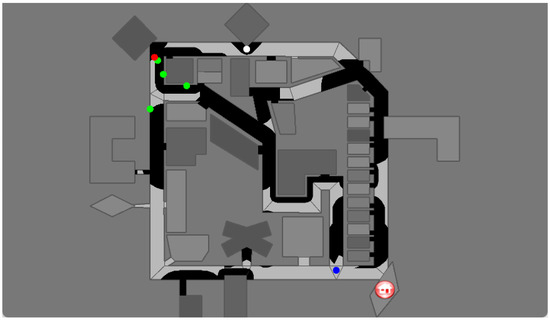
.
August 10, 2026
- Following the instructions at Getting Started of the Avular ROS examples, I installed zenoh-bridge-ros2dds=1.0.3.
- Yet, the setup of the zenoh-bridge fails on cannot find 'systemctl' - cannot install zenoh-bridge as service.
- There are again 401 packages to be updated, yet, this fails because the repo of zenoh is installed without signature.
- Looking at Zenoh ROS2 integration.
- The key can be installed with instructions from eclips zenoh github.
- Had to remove the trusted=yes version of the zenoh repository added to /etc/apt/sources.list just added following Avular's instructions.
- Should check step 4 and 5 of Getting Started once at LAB42.
-
- Received the download for Cereba Studio (both Windows and Ubuntu 22.04). Version 3.1.0.
- Now I see the mission planner and the mapping plugin.
- Could connect to Origin One, need to localize with the AprilTags before I can go further.
-
- Tried zenoh-bridge-ros2dds -m client -e tcp/:7447. Argument -m not known.
- The -m (mode) is not needed. zenoh-bridge-ros2dds -e tcp/:7447client works fine. Can see all Avular Origin topics on nb-dual.
-
- Next example are navigation examples.
- The first example gives the current speed (0.0 m/s): ros2 run navigation_examples get_velocity.
- The second example gives the current position (0.0, -0.0, -0.01): ros2 run navigation_examples get_2dpose.
- The third example should drive 1m forwards, but that fails: ros2 run navigation_examples set_velocity. The error: Could not import 'rosidl_typesupport_c' for package 'origin_msgs'
- Tried colcon build --packages-select origin_msgs. Got a warning on using pkg_resources, but the package is build.
- Looked at Jake Carter's comment on this issue.
- Did grep python . -r, and saw that rosidl_typesupport_c.cpython-36m.
- Added line find_package(Python3 3.10.12 EXACT REQUIRED COMPONENTS Interpreter Development) before I include find_package(ament_cmake REQUIRED) in the CMakelist.txt of origin_msgs, still the 3.6 version is compiled
- Also made that change for /opt/ros/humble/share/ament_cmake_core/cmake/core/python.cmake. That has an effect:
`
/home/arnoud/.local/lib/python3.10/site-packages/cmake/data/share/cmake-4.1/Modules/FindPackageHandleStandardArgs.cmake:227 (message):
Could NOT find PythonExtra (missing: PythonExtra_EXTENSION_EXTENSION
PythonExtra_INCLUDE_DIRS PythonExtra_LIBRARIES PYTHON_SOABI.
PythonExtra_EXTENSION_SUFFIX
- In /opt/ros/humble/share/rosidl_generator_py/cmake/rosidl_generator_py_generate_interfaces.cmake there was a find_package(PythonInterp 3.6 REQUIRED). Old style, and old Python version. Commented it out.
- Inspected the build verbose wise with colcon build --packages-select origin_msgs --event-handlers console_cohesion+ --cmake-args -DCMAKE_VERBOSE_MAKEFILE=ON.
- There is another module which is still active:
-- Using all available rosidl_typesupport_cpp: rosidl_typesupport_fastrtps_cpp;rosidl_typesupport_introspection_cpp -- Found Python3: /usr/bin/python3.10 (found suitable exact version "3.10.12") found components: Interpreter
-- Found python_cmake_module: 0.10.0 (/opt/ros/humble/share/python_cmake_module/cmake)
CMake Warning (dev) at /opt/ros/humble/share/python_cmake_module/cmake/Modules/FindPythonExtra.cmake:52 (find_package):
Policy CMP0148 is not set: The FindPythonInterp and FindPythonLibs modules
are removed. Run "cmake --help-policy CMP0148" for policy details. Use
the cmake_policy command to set the policy and suppress this warning.
-- Found PythonInterp: /usr/bin/python3.6 (found suitable version "3.6.15", minimum required is "3.6")
- Removed the old cmake (v4.1) from my ~/.local/bin
- Experimenting with /opt/ros/humble/share/python_cmake_module/cmake/Modules/FindPythonExtra.cmake.
- Yet, /usr/share/cmake-3.31/Modules/FindPackageHandleStandardArgs.cmake cannot find Could NOT find PythonExtra (missing: PythonExtra_EXTENSION_EXTENSION
PythonExtra_INCLUDE_DIRS PythonExtra_LIBRARIES PYTHON_SOABI
PythonExtra_EXTENSION_SUFFIX).
- Yet, this FindPackageHandleStandardArgs was called from FindPythonExtra.cmake itself, so skipped for the moment.
- Much better, 91% is build, only _battery_info_s.c is missing #include . Strange, because python3.10-dev is installed.
- Added in the CMakeLists.txt of origin_msgs a line include_directories(/usr/include/python3.10), which solves this. Now see if it also runs.
- No, it fails:
File "~/avular_ws/install/origin_msgs/local/lib/python3.10/dist-packages/origin_msgs/srv/_set_control_mode.py", line 298, in __import_type_support__
module = import_type_support('origin_msgs')
File "/opt/ros/humble/local/lib/python3.10/dist-packages/rosidl_generator_py/import_type_support_impl.py", line 48, in import_type_support
raise UnsupportedTypeSupport(pkg_name)
rosidl_generator_py.import_type_support_impl.UnsupportedTypeSupport: Could not import 'rosidl_typesupport_c' for package 'origin_msgs'
- Tried it again on WS9. Now it build and executes fine, no modification of the CMakeLists.txt is needed.
- Yet, setting the velocity gave: Couldn't get control of the robot.
-
- Couldn't find it the documentation, so debugged and solved it with UvA AI chat:
ros2 interface show origin_msgs/srv/SetControlMode
# Request to set the control mode to the desired mode
# Desired mode
origin_msgs/ControlMode mode
uint8 NONE=00
uint8 MANUAL=10
uint8 TELEOPS=11
uint8 MANUAL_MAPPING=12
uint8 AUTOPILOT=20
uint8 DOCKING=21
uint8 USER=30
uint8 mode 0
---
# Whether the request was accepted
# It can fail in the following cases:
# * The transition was not allowed.
# * The target mode is not in the set of known control modes
bool success false
# Message containing either:
# * Success message
# * Reason why the request failed/was rejected
string message "Unexpected Error. Response message not set."r
ros2 service call /robot/cmd_vel_controller/set_control_mode origin_msgs/srv/SetControlMode "{mode: {mode: 0}}
ros2 service call /robot/cmd_vel_controller/set_control_mode origin_msgs/srv/SetControlMode "{mode: {mode: 30}}
ros2 run navigation_examples set_velocity
[INFO] [1786378013.764470268] [velocity_commander]: service call done
[INFO] [1786378013.764773169] [velocity_commander]: Obtained control of the robot
[INFO] [1786378013.965166882] [velocity_commander]: Setting a reference velocity of 0.50 [m/s] going forward and 0.00 [deg/s] turning
...
[INFO] [1786378014.765180729] [velocity_commander]: Setting a reference velocity of 0.50 [m/s] going forward and 0.00 [deg/s] turning
[INFO] [1786378014.771887129] [velocity_commander]: service call done
[INFO] [1786378014.772019552] [velocity_commander]: Done sending velocities, and released control of the robot
August 7, 2026
- Charging the Avular Origin One.
- Should start with Starting up the robot.
- Needed to switch off before it could start again.
- Trick to control it with the remote was the button 'O'.
- Seems that you can charge while the robot is on.
- Checking the connection. According to Finn it should connect to DNT_5G, but the small screen shows no connection.
- Strange, because I can see that connection from my Windows labtop.
- Used the Wifi-stick from the DroneSaur to connect both to internet and the Origin. The password in Finn's labbook worked
- Was busy with Connecting to external network. If I interpreted the small screen, the Origin Access Point was on. On WLAN I saw both vislab and DNT_5G. Also added LAB42, after adding the mac-address in iotroam.org.
- The NMTUI shows a succesfull connection with an asterix, yet the screen shows no access point, nor wifi.
- Connected via ethernet, see networking.
- Connected via LAB42. THe lower left icon is now green. The lower right is still red (sound?).
- Logged in via ssh to Origin via LAB42.
- Next step should be Map creation.
- Started up Cerebra Lab. I have version 1.10.0.
- Via Robot discovery I can connect via ssh (ethernet-based). Yet, I don't see the device option from Avular, nor the Mission Planner or Mapping.
-
- Switched to Ubuntu partition of nb-dual.
- No Cerebra Lab here. Instead tried the first step of the ROS-examples: Setting up.
- Created a new workspace avular_ws and cloned example_origin_ros.
- snap is installing some packages in the background, so have to wait until finished to install navigation_msgs (and the other packages to be updated).
- System gets low on disk-space, so time to clean something up.
- As expected, ros-humble-nav2-msgs were already installed.
- pip installed uuid, no candidate found for json.
- Trying colcon build --symlink-install. Got several warnings on deprcate pkg_resources, and unknown distribution option tests_require. Also a cmake --help-policy CMP0148 warning for the rosidl_generator_py while creating the knowledge_base_msgs. Yet, all 8 packages finished.
- Next is Getting started with the robot.
- This requires setting up a Zenoh bridge.
- First tried the user container.
- On the origin, did cd /data/user/containers; docker compose up -d. This extracts downloads several packages. Connected to the user container with docker exec -it user /bin/bash. Checked the topics, got a long list (ROS_DOMAIN_ID=32):
/autopilot/amcl/initial_pose
/autopilot/amcl/transition_event
/autopilot/amcl_pose
/autopilot/artag_pose/transition_event
/autopilot/behaviortree_executor/status
/autopilot/cartesian_gnss/transition_event
/autopilot/controller_server/transition_event
/autopilot/coordinate_system
/autopilot/dock_tracker/transition_event
/autopilot/estimated_pose
/autopilot/global_costmap/global_costmap/transition_event
/autopilot/gnss/pose
/autopilot/gridslam/transition_event
/autopilot/information_manager/system_status
/autopilot/lidar/points_filtered
/autopilot/lidar/scan_filtered
/autopilot/line_tracker/tracked_lines
/autopilot/local_costmap/local_costmap/transition_event
/autopilot/map_external
/autopilot/map_layout_polygon
/autopilot/mapping/map
/autopilot/mapping_gui/transition_event
/autopilot/marker_based_robot_pose
/autopilot/marker_localization/transition_event
/autopilot/marker_pose
/autopilot/max_path_distance
/autopilot/path_recorder/transition_event
/autopilot/plan_twist
/autopilot/planner_server/transition_event
/autopilot/sentence_to_speak
/autopilot/speed_limit
/client_count
/connected_clients
/diagnostics
/initialpose
/origin_power_management/low_power_mode_active
/parameter_events
/robot/battery/info
/robot/camera/color/camera_info
/robot/camera/color/image_raw
/robot/camera/color/image_raw/compressed
/robot/camera/color/image_raw/compressedDepth
/robot/camera/color/image_raw/theora
/robot/camera/color/metadata
/robot/camera/depth/camera_info
/robot/camera/depth/image_rect_raw
/robot/camera/depth/image_rect_raw/compressed
/robot/camera/depth/image_rect_raw/compressedDepth
/robot/camera/depth/image_rect_raw/theora
/robot/camera/depth/metadata
/robot/camera/extrinsics/depth_to_color
/robot/cmd_vel
/robot/cmd_vel_joy
/robot/cmd_vel_user
/robot/control_mode
/robot/docking_action
/robot/gnss/fix
/robot/gnss/status
/robot/initial_heading
/robot/joint_states
/robot/joy
/robot/joy/set_feedback
/robot/lidar/metadata
/robot/lidar/points
/robot/mode_of_operation
/robot/odom
/robot/odometer/m_driven
/robot/odometer/s_running
/robot/origin_network_telemetry/network
/robot/ouster/transition_event
/robot/robot_description
/robot/safety_supervisor/emergency_brake_active
/robot/safety_supervisor/velocity_limits
/robot/set_collision_avoidance
/robot/set_obstacle_avoidance
/robot/system_info
/rosout
/tf
/tf_static
/uas1/mavlink_sink
/uas1/mavlink_source
/user_events
- Those topics are not visible from nb-dual (even with ROS_DOMAIN_ID set). Only difference with user container is ROS2CLI_DDS_WRAPPER_DISABLE=1.
August 6, 2026
- Should try out OAK4D on Avular Origin code from Finn.
- Avular has updated some of their ROS examples. For sure the navigation examples look interesting. Path planning is part of the behavior examples.
May 18, 2026
April 21, 2026
- The Avular Origin One has arrived. The robot is now connected to the DNT network, and the default password is changed.
- Documentation can be found Avular support.
March 30, 2026
March 4, 2026
January 20 2026
January 19, 2026
- Found DARPA Subterranean Challenge: Multi-robotic Exploration of Underground Environments, and although the conference is on simulation, simulation is only mentioned as 'To address the
importance of the software solutions, DARPA also organized a “virtual track”
where the teams provide software solutions only, and the contest occurs in realistic
simulations of the deployment sites. As expected, most teams regularly test
their software in simulation as part of the development process, as simulation
of the systems is much less tedious compared to real-world testing. Moreover,
simulation allows us to test the individual software modules in isolation as well
as in a holistic manner'
- I should check if there is a survey article on the agent competition after "A survey and analysis of task allocation
algorithms in multi-robot systems” (Cited 74x). Check:
January 13, 2026
Labbook 2025
Labbook 2024
Labbook 2023
Labbook 2022
Labbook 2021
Labbook 2020
Labbook 2019
Labbook 2018
Labbook 2017
Labbook 2016
Labbook 2015
Labbook 2014
Labbook 2013
Labbook 2012
Labbook 2011
Labbook 2010
Labbook 2009
Labbook 2008
Labbook 2007
Labbook 2006
Labbook 2005
Labbook 2004